Last updated on December 20th, 2025 at 02:42 pm
Ok, I will be frank, I would wait all the year to get Spotify Wrapped, like it was Christmas Day. Then I discovered that Spotify has been releasing weekly statistics that can be reviewed at any time. Game changer.
Want to know how to view your stats on Spotify without having to wait until December, this is all you need to know.
Table of Contents
To Simple Visitors: See Your Listening Stats Now.
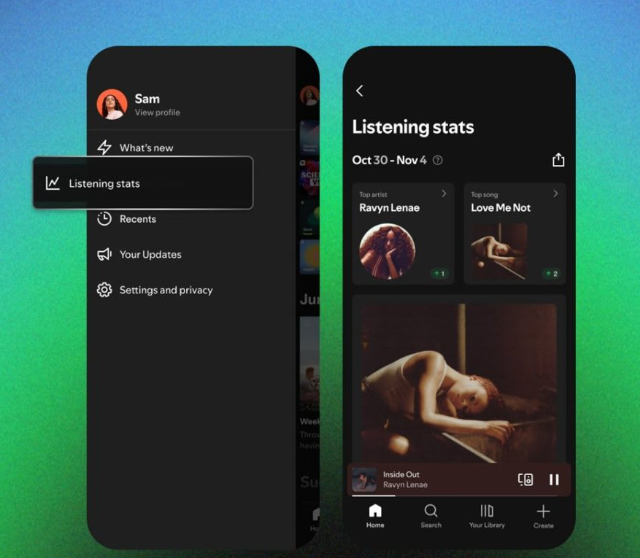
Spotify introduced a new functionality called Listening Stats, which can be used by both the free and premium users of the platform in more than 60 countries. Here’s how to find it:
Step 1: Launch the Spotify mobile application (cof, it is not a mobile service yet).
Step 2: Select the profile icon on the right side in the top corner.
Step 3: Find an entry of Listening Stats in the menu.
That’s it. Your best artists and music of the last four weeks will be there refreshed each day. It is just mini-Wrapped, which constantly updates.
What I like most? You receive personalized playlists on what you are obsessed with recently, as well as small details on your listening. And as opposed to Wrapped, you do not need to wait until the end of November to know how you were, what you were into.
What You’ll Actually See
The breakdown of your stats is into several sections:
- Top Artists These are the artists you have been listening to most in the past month.
- Top Songs -Your most listened to songs in the same period.
- Curated Playlists -Automatic Mixes based on the taste of what you have recently listened to.
- Listening Highlights – Fun statistics such as; you have discovered 12 new artists this week.
The catch? At this point, the desktop users are excluded. The new features of Spotify are mobile focused but you can always use annual Wrapped when it becomes available through the browser.
Sharing Your Stats
Here’s where it gets fun. You are even able to direct your stats to Instagram stories, Tick Tok, or WhatsApp. Spotify breaks them down into shareable cards, meaning you will not need to strangle and screen-shot them.
I already noticed my feed full of people brandishing its niche indie acquisitions. It’s the new humble brag.
To Artists: Your Real-Time Dashboard.
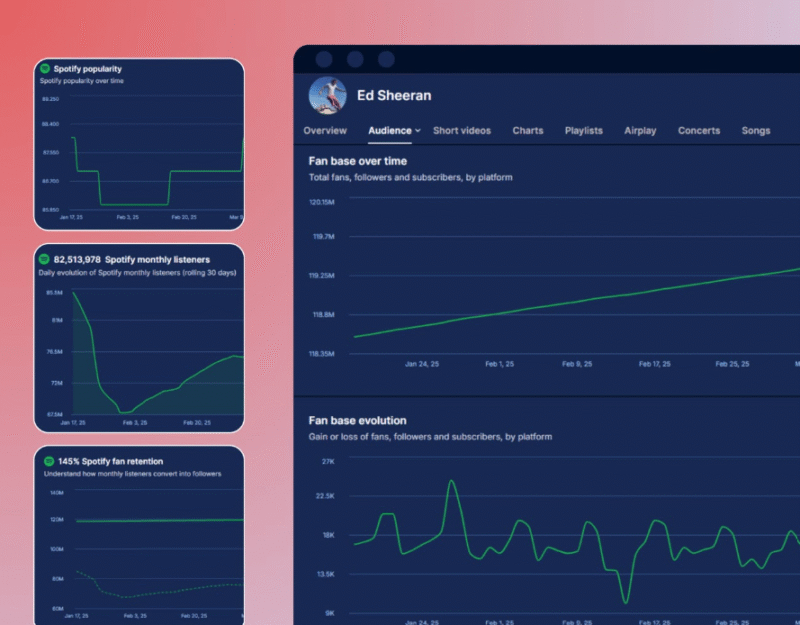
In case you produce music, Spotify provides the so-called Spotify for Artists and provides a dashboard where you can track real-time analytics. Here’s how to access it:
Step 1: Visit artists.spotify.com and make your artist profile (assuming you do not already have one).
Step 2: On the next pages, being checked, you will be redirected to the Home tab where you will get the account of current listeners and recent playlist addition.
Step 3: Find your way through the following sections:
- Music– Track-by-track individual music stream counts, saves and audience trends.
- Audience– Demographics of age, sex, location and similar artists that your fans are listening to.
- Profile– Approach your artist bio, pictorials and text.
What is wildest is how gritty it becomes. Instantly, you can view the top streaming in your cities with the top streams, playlists and even the most active listeners are at work. The best choice to release at the right time or organize a tour.
The reason why Artists should actually use this.
The thing is following: there are almost 126 million songs and 60,000 new songs uploaded every day, and it is very difficult to stand out. But statistics assist in determining where your loyal fans are developing.
You see a spike in Sao Paulo- perhaps there is a next ad campaign you want to do or a showbooking. Or when a certain track gets saved and not played a bunch of times, then it is not playlist-friendly at that time, perhaps.
The data’s there. Most of the artists simply do not look at it.
Third Party Worth Examining Tools.
When the in-built statistics of Spotify is insufficient, some external tools, such as Venerable, Chartmetric, and Stats for Spotify, could be used to add more market information provided. I have used the Stats of Spotify – it is free and provides you with a neat breakdown without applying to the verification of the artist.
FAQ’s
Can I see stats on desktop?
And not due to the new Listening Stats feature. Mobile only. Yet, desktop get Wrapped yearly though.
How often do stats update?
Listening Stats is updated on a daily basis and Wrapped is updated on an annual basis.
Are these stats private?
Yep, that is unless you prefer to share them. Just accidentally crack on your privacy settings if you are concerned.
Why This Matters
Spotify statistics provide you with a tangible object to operate with whether you are just curious about what you are guilty of and whether you are an artist who is trying to improve. For listeners, it’s fun. For artists, it’s strategy.
And honestly? It does not have to wait until December to discover that you had played the same sad playlist 400 times.
Also Read:
How to Remove iCloud Activation Lock Without Previous Owner: Your Complete Fix Guide

I’m a technology writer with a passion for AI and digital marketing. I create engaging and useful content that bridges the gap between complex technology concepts and digital technologies. My writing makes the process easy and curious. and encourage participation I continue to research innovation and technology. Let’s connect and talk technology!


