Last updated on December 20th, 2025 at 03:44 pm
I understand. December comes, everybody is rushing to discover their Spotify Wrapped. You are scrolling your feed and looking at everyone and are like, Why are yours not there?
I have been a Spotify user for a long enough time, and every Wrapped season is associated with the same turmoil. Now here is the thing: I am going to go step by step on how to access Spotify Wrapped 2025 on both mobile and desktop and what to do in case it is not appearing.
Table of Contents
The Fastest Way to Find Your Wrapped (Mobile)
Spotify released Wrapped 2025 on December 3 rd, and to be sincere, they made it a relatively simple task to locate this year. Here’s what worked for me:
Method 1: Home Screen Banner
Launch your Spotify application and go to the top of the Home page. They should have a glaring banner that must be seen as saying Your 2025 Wrapped. Just tap it, and you’re in.
In case you do not notice it immediately, you do not have to panic. It only loads after a few minutes, particularly when each one is checking theirs simultaneously.
Method 2: Use the Wrapped Tab
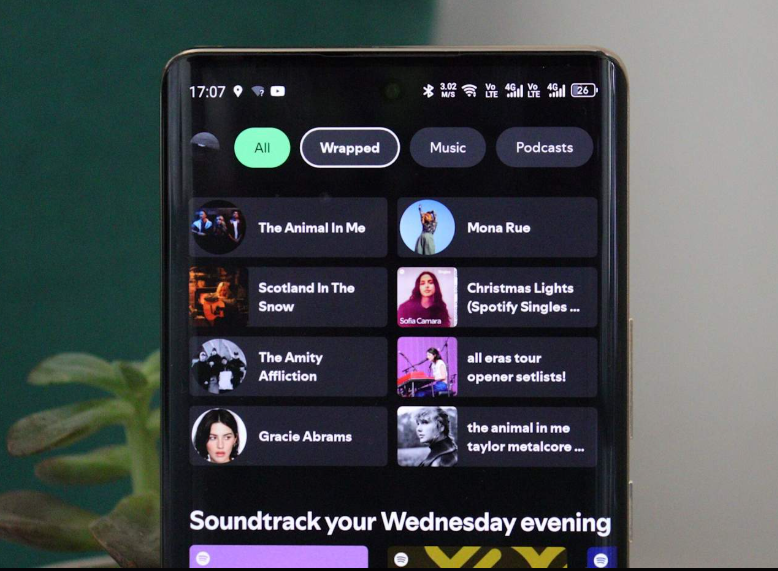
A “Wrapped” tab is just right beside the “All” button on the top of your Home screen. Simple as that.
In fact, I like this approach, since it is stable, even when the banner is removed at some point later, the tab will remain in a place during several weeks.
Method 3: Search Bar Trick
In situations when nothing works, I will resort to this one. Into the machine, you will need to type in Type 2025 Wrapped or spotify:datastories:wrapped. Press enter and Spotify will bring up your Wrapped automatically.
Oh, one more tip; when you want to appear fancy, the second search word (with the colon) will take you to your stats directly. Works every time.
Method 4: Check Your Library
Go into your Library area and scroll down a few notches and you will find a 2025 Wrapped section there. It is not necessarily the quickest way but it is certain.
Accessing Wrapped on Desktop (Yes, It’s Possible)
The catch is herein the fact that the entire interactive experience is mobile-based. This I found out last year when I was caught displaying my stats on my laptop, during a work break.
Yet you have not fallen totally behind the curve. Go to spotify.com/wrapped in your browser and it will open the app in your phone. There are also some statistics that you can view on the web player, though it will not provide that entire sort of story feel as it does with all the animations and other bonuses that go along with it such as Wrapped Party.
Should you be strictly determined to watch in desktop mode, then the best chance is to open up the web version, see what is offered before going on mobile.
What all is new this year (Why it matters).
The Wrapped 2025 is the aggressive response by Spotify to the outcry over the AI-heavy nature of the 2021 iteration of the feature. It was said to feel generic and people reverted to fan favorites and introduced even more cool stuff.
Listening Age, this one is crazy – it determines your music age by the time the songs that you listen to the most were released. Mine was 28, and… that makes sense, actually.
According to the listening style, you are divided into one of six categories by the clubs. Remember it as a personality test, but about your taste in music. I was sorted into something mood-based and it was strangely true.
Wrapped Party is a fresh product this year, and you can have up to 10 friends in it against your listening statistics. It is only available on a mobile platform, yet it is an entertaining way of transforming your data into a group chatroom.
They also revived Top Genres (last but not least) and introduced Top Albums. Moreover, now you can speed up and slow down the playing process, as well as skip the content instead of making it run through the entire experience automatically.
Troubleshooting: When Your Wrapped Isn’t Showing Up
This happens every year. Herein lies my mode of treatment at the hands of my Wrapped ghosts:
Close and reopen the app. I know, it is so elementary, though it works, more frequently, than it ought.
Update your app. Open the Play Store or the App Store and ensure that you are using the most current version of Spotify. Very old applications will not have Wrapped.
Log out and log back in. It makes Spotify re-synchronize your account data. Sometimes that’s all it takes.
Clear your cache. It is under settings storage, clear cache. This will not erase your downloads or playlists, it will only erase temporaries that could be causing some problems.
Uninstall the app, re-install. Nuclear option, though when all other methods fail, this normally works.
Use the web player. Open the site visit spotify.com/wrapped on the browser of your phone. In some instances, the mobile browser version would load where the app fails to.
Try the manual search. near:type:spotify:datastories:wrapped in the search box. It does not go through any homepage.
Why You Might Not Have a Wrapped
In case you have tried it all and nothing, you may not be eligible because of the following reasons:
A minimum of 30 songs played longer than over 30 seconds in a minimum of 5 artists during the year is required. That may not be hit by someone who is using Spotify as a casual listener or even recently.
Your total minutes count is taken into consideration with private mode but does not affect your taste-based stories, such as top genres. Then, in case, you have been listening in Private Mode all year, your Wrapped may be Imagery Slim.
Joint accounts tamper with the information. When using a family plan and entering into a personal profile by lots of people, your Wrapped will indicate all the listening trends, and this is why it will appear strange.
Also, Wrapped is not offered in all countries because of the data privacy laws. That may prevent access in case you are traveling or are using a VPN.
How Long Is Wrapped Available?
According to past years, Wrapped tends to linger until the middle of January. Then no need to panic about it, however, in case you may not see an opportunity to grab it on the date of release.
That being said the sooner the better. During the initial days, servers may become overloaded, therefore, in case of troubles with loading it, get another chance later in the evening or the following morning.
Final Thoughts
Spotify Wrapped 2025 is significantly superior to that of the previous year. Their attentive listening addressed people’s grievances, reintroduced what was popular, and introduced mechanisms that actually feel helpful rather than tacky.
When using it on mobile, you will get the whole experience, the desktop users are restricted, but at least you see something. And in case your Wrapped is not being registered, follow through the troubleshooting instructions before you think you are not eligible.
But above all, just don’t think too hard about it. It is simply a mirthful wrap up of what you have been listening to all year. You can share it or you can compare something with your friends or you can simply go past it. Either way, it’s yours enjoy it.
Read:
Spotify Lossless Audio: All You Should Know before Turning it on.
How to See Your Stats on Spotify: Quick Guide for Users & Artists

I’m a technology writer with a passion for AI and digital marketing. I create engaging and useful content that bridges the gap between complex technology concepts and digital technologies. My writing makes the process easy and curious. and encourage participation I continue to research innovation and technology. Let’s connect and talk technology!


