Have you forgotten being able to simply ship code and not document all the components within it? Those days are gone. I began to take an interest in Software Bill of Materials (SBOM) after completing a project that was flagged as using a library that contains a critical vulnerability, alibrary that we did not even know we were using. It is not only some kind of compliance checkbox. It’s actually useful.
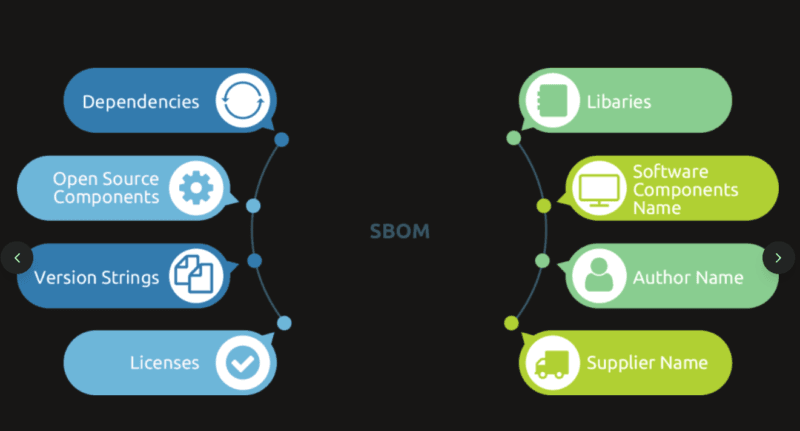
An SBOM is a software ingredients list basically. It reveals to you just what you have included in your application: libraries, dependencies, version, licenses. Visualize it in the same way the nutrition label on your food, with a different set of metrics of open-source packages and security risks. And it you are creating or creating anything that involves dealing with data or the internet or goes into production, you require one.
The guide includes a breakdown of what SBOMs are, why they are important, which standards work in practice, and how to automate the entire process in a way that will not increase your workload. You may be a developer who needs to ensure that its pipeline is secure or a manager who is determining whether this is worth the hassle, here is what you need to know
Table of Contents
What Is an SBOM and Why Does It Matter?
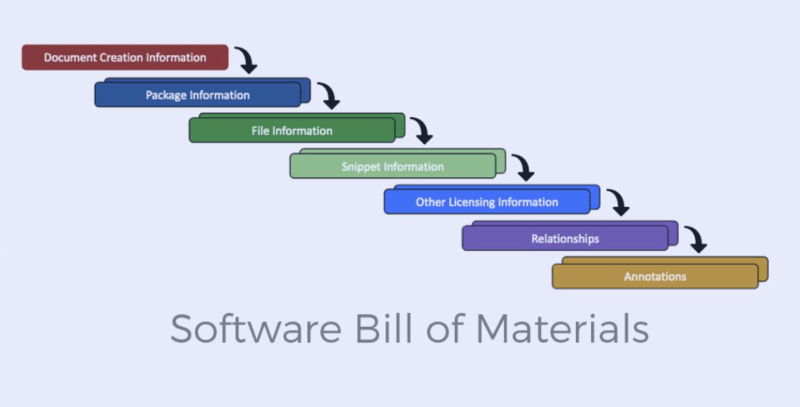
Software bill of materials An inventory of all the content of a software product formally and in machine-readable form. It enumerates all libraries, frameworks, modules, and dependencies- with their version, their suppliers and dependencies. It is not a new concept, though the concept received media attention following high-profile supply chain attacks such as SolarWinds and Log4Shell.
The point is as follows: the majority of the modern applications are not developed on a case-by-case basis. They are made of dozens or hundreds of parts that are made by third parties. You drag in a library to be authenticated, a logging library, perhaps a user interface framework and before long you have code being executed that you have never audited. SBOM provides an insight into that stack.
Transparency and Visibility
The first one is transparency. An SBOM allows seeing the exact decisions and applications being used in your environment. A new CVE is released, such as the mayhem with the Log4j, and you can query your SBOM and be in the know about whether you are vulnerable in a matter of minutes. Most systems lack one to search in all repository and configuration files and hope you have it all.
This was realized last year during a security audit. Several days were spent when the team was trying to monitor which services were utilizing a particular version of a Java library. The answer would have been immediate given that we had generated SBOMs per service. It is what it counts, speed and accuracy.
Software Supply Chain Security
Software Supply Chain Security includes SBOMs. Software supply chain involves all the elements, tools and processes in the construction and delivery of the software. The maleficers do not only attack your code, but also attack your dependencies, build tools and third-party libraries. The SBOM will assist you to keep an eye on that entire chain and ensure that it is secure.
This was realized by the U.S. government. In 2021, the federal agencies were mandated by the Executive Order 14028 to purchase software vendor-supplied SBOMs. Other industries followed. In case you are selling software to the regulated industries, including healthcare, finance, defense, and so on, you will probably be required to submit SBOMs as a component of the agreement.
SBOM Standards: SPDX, CycloneDX, and NTIA Minimum Elements
SBOMs are not all equal in creation. It has several formats and the selection of the incorrect format may create compatibility problems in the years to come. The three standardized big are SPDX, CycloneDX and the minimum elements system that is used by the NTIA.
SPDX (Software Package Data Exchange)
The oldest and popular standard is SPDX. The Linux Foundation developed it and made it an ISO standard ( ISO/IEC 5962:2021). The emphasis that SPDX has on licensing information makes it trendy among open-source circles.
An SPDX document includes:
- Package names and versions
- There are license identifiers (with the standardized SPDX license IDs).
- File checksums
- Data of suppliers and originators.
- Interconnections amongst elements.
Several formats are supported by SPDX: tag-value, JSON, YAML and RDF. When you are in the open-source working environment or it is highly required to set licensing rules, it is better to use SPDX. I have applied it in projects where licensing was very important and it managed to deal with it.
CycloneDX
OWASP created CycloneDX to be used in the security context. It is also not hefty as SPDX and is more oriented towards vulnerability management. CycloneDX tends to be simpler to work with in case your main objective is to track security threats.
CycloneDX supports:
- Minnie, frames and applications Component inventory (libraries, frameworks, applications)
- CVE (Common Vulnerability Empiric), CWE (Common Weakness Empiric) and GHSA (Golden Henrietta Syndrome).
- APIs, microservices Service definitions.
- Licenses (however, not as detailed as SPDX).
It is in Java Script Object Notation and XML formats. My experience indicated that security teams like to use CycloneDX since it can easily be integrated with vulnerability scanners and threat intelligence systems. It is also smaller, and this counts when producing SBOMs of hundreds of microservices.
NTIA Minimum Elements
The National Telecommunications and Information Administration (NTIA) developed a guideline on what any SBOM must contain, irrespective of the format. These minimum elements are:
- Author/supplier of the SBOM
- Component name
- Version of the component
- Unique identifier (e.g. a Package URL or CPE)
- Dependency relationships
- Timestamp of the SBOM
Both SPDX and CycloneDX are capable of fulfilling the requirements of NTIA. Minimal elements framework does not concern file format as much as it does make SBOMs useful. Assuming that you are new have a friend To validate your SBOMs, use the checklist provided by NTIA before sending them.
Which Standard Should You Use?
Here’s a quick breakdown:
- SPDX: Ideal when it comes to open-source projects, license compliance as well as wide industry acceptance.
- CycloneDX: Security teams, DevSec pipelines, vulnerability monitoring should use it.
- NTIA Minimum Elements: Minimum Elements Use Only as the validation Checklist and not as a file format.
You can also generate both. There are tools that help in generating multi-format output, meaning that you will be able to use SPDX to license and CycloneDX to keep your securities. All you need to do is to ensure that your consumers can really read the format you are using.
Automated SBOM Generation in CI/CD Pipelines
Creating SBOMs is a time-wasting process. Automation is the only feasible option here, which is to construct SBOM creation as a part of your CI/CD pipeline. Each artifact will result in an SBOM.
Tools for SBOM Generation
SBOMs may be created using a number of tools. Here are the ones worth using:
Syft (from Anchore): Crawls container files, filesystems and archives. Outputs SPDX and CycloneDX. It is rapid, open-source and can be utilized in workflows in containers using Docker. I have worked on Syft in Jenkins pipelines, and it builds SBOMs in a few seconds.
Language-specific CycloneDX CLI: Transformations to CycloneDX SBOMs. It has Maven, Gradle, npm, pip and others as plugins. When in a particular language ecosystem, the native CycloneDX tool normally fits well.
Tern: Produces SBOMs based on the inspection of containers using layers. Specifically, it is excellent in learning what was provided in the base images and what you have incorporated. Brings in handy during the debugging of bulky containers.
Supplier-centric, vendor-neutral, and business-backed tools: This is a fairly recent category of tools utilizing this approach and increasingly supported by major vendors like Microsoft or Facebook, focusing on integrating all these components through a space schematic representation.
Microsoft SBOM Tool: A Microsoft-sponsored open-source tool integrating withAzure DevOps and GitHub Actions. Supports SPDX format. This is an easy choice in case you are already inside the Microsoft ecosystem.
Integrating SBOM Generation into CI/CD
The trick is that you create SBOM when you are creating artifacts. Here’s a typical workflow:
- Create your application Compile code, test, package artifact (container image, JAR, binary, etc.)
- Run SBOM Generator Run Syft, CycloneDX CLI or another tool with the build artifact.
- Store the SBOM: Store it with your build (e.g., in artifact storage, such as Docker registry, S3, Artifactory)
- Sign the SBOM (not mandatory, but suggested): Cosign is used to cryptographically sign with your signature the SBOM to demonstrate that it was generated by your pipeline.
The following is a case of GitHub Actions and Syft:
- name: Build Docker image
  run: docker build -t myapp:latest .

- name: Generate SBOM
  run: syft myapp:latest -o spdx-json > sbom.spdx.json

- name: Upload SBOM
  uses: actions/upload-artifact@v3
  with:
    name: sbom
    path: sbom.spdx.json
This will guarantee that each release has a SBOM. You are not even counting on somebody recalling to make a script run manually.
Handling Multi-Language Projects
When your project consists of several languages, e.g. a Python back-end, and a JavaScript front-end, you will have to compute SBOMs in each case. The majority of SBOM tools concentrate on a language ecosystem. The remedy is to use a set of tools and combine the outputs.
For example:
- Use npm-sbom as the frontend to the Node.js.
- Backend Python python plugin Use pip-audit or CycloneDX backend.
- Combine two SBOMs into one document with the help of a tool such as sbom-tool or home-written scripts.
I discovered that merged SBOMs may become unmanageable when the names used as components conflict or when the different versions clash. Majorly check the final output before publication.
SBOM Consumption: Vulnerability Tracking and Risk Assessment
The creation of SBOMs is not the whole task. Their actual usefulness lies in using them – to identify the vulnerabilities in your software stack, gauge the risk, and make knowledgeable decisions about risk.
Vulnerability Scanning with SBOMs
SBOMs can be forwarded into vulnerability scanners when you have an SBOM. Rather than examining the whole application, the scanner compares the SBOM with a vulnerability databank such as the National Vulnerability Database (NVD), GitHub Advisory Database or OSV.
Vulnerabilities scanners that take SBOMs:
- Get All Vulnerability Feeds(from SBOM): Compares SBOM elements with bad feeds.
- Dependency-Track: the open source SBOM management and analysis system.
- Snyk: Commercial tool, which takes SBOMs and gives an actionable remediation guidance.
- Trivy: Multipurpose scanner that supports the analysis of SBOMs of CVEs.
The workflow looks like this:
- Generate SBOM during build
- Feed SBOM to a vulnerability scanner.
- Scanner determines referring components that are known to have CVEs.
- Rank according to severity and susceptibility.
- Repair or change defective vulnerable parts.
It was my experience that SBOM-based scanning is quicker than full-stack scanning (conventional). The same binaries are not being re-scanned each time, only checking the list of components against new vulnerable data.
Risk Assessment and Prioritization
There are not all vulnerable points that are dangerous. With the help of an SBOM, you are able to evaluate risk by revealing to you:
- What are the internet facing components?
- Which are transitive (are pulled in by another one) dependencies?
- What libraries are used and what ones are not being used?
In case, as an illustration, your SBOM tells you that you are using an old logging library only invoked during startup, it may be a low risk. However, when that same library is included in your authentication process and has a remote code execution vulnerability, then it is critical.
SBOM-based risk policies can be configured using tools such as Dependency-Track. You are either able to label components containing high-severity CVEs, halt deployments in case of identified critical vulnerabilities, or receive notifications in case new vulnerabilities are detected in your stack.
Tracking Component Freshness
SBOMs are also beneficial in keeping track of the freshness of dependencies. When you are executing packages that were published in 2018, then chances are that you have not been approached with security patches, bug fixes and performance enhancements. SBOM eases when it comes to recognizing the components that are labeled as outdated and as such organize updates.
Other teams employ thresholds: the life of any component is over two years long and it is flagged to be reviewed. Others apply SBOM diff tools to calculate changes between releases and view what has changed in between.
Continuous Monitoring
SBOMs allow constant monitoring. You are no longer required to conduct security scans once every quarter, but you can check on your SBOMs on a daily basis. New CVEs are added on a regular basis. Provided that the SBOM is current and is interconnected with a monitoring platform, you will be notified within a few hours of whether your software is susceptible to a new vulnerability.
It is here that the change of the static security to dynamic security takes place. You are not only performing one check when bargaining the release of a product–you are monitoring risk all through the lifecycle.
Common Challenges and How to Handle Them
Implementation of SBOM is not necessarily an easy task. These are the points that I have observed raise and the way to address it.
Incomplete or Inaccurate SBOMs
The automated tools do not always set everything on fire. They may not get dynamic-loaded libraries, vendor-specific code or custom code. Manual check and validation is the solution. Once it has been generated, compare spot-check the SBOM with your real dependencies. When a tool has the missing something, then open a bug with the tool maintainer or put it in.
SBOM Overload
Thousands of components may make big application. The SBOM gets overwhelming. To cope with this direct the attention to direct dependencies. Dependencies (of dependencies) that are dependent are less important other than when they are susceptible. Apply filtering and classification on features of your SBOM managing system.
Format Compatibility
There are tools that do not support every format. Your tooling may only produce CycloneDX whereas a vendor may need SPDX. There are conversion tools such as sbom-utility which are however not flawless. You can adjust your generators so that they come out as the format you are likely to require.
Keeping SBOMs Updated
SBOMs go stale fast. In case you update a library, but do not re-generate SBOM, then your data is incorrect. The fix is automation. Integrate the creation of tie SBOM with each build, each deployment, each release, etc. Unless it becomes automated then it will not keep up to date.
Best Practices of SBOM Implementation.
The following works depending on how it is used in reality:
Automate immediately: You do not have the time to automate it later on when you have time. Add considerably SBOM to CI/CD.
Archive SBOMs: Archive the SBOM and its thing that it describes. In the event that you deploy a container, the SBOM must be in the identical registry.
Sign your SBOMs: Sign SBOMs with such tools as Sigstore or Cosign. This shows that they have not been doctored with.
Disseminate SBOMs to stakeholders: As a vendor, give customers SBOMs. As a customer ask them to suppliers.
Monitor constantly: SBOMs should not be treated as documents. Insert them into surveillance systems and monitor the vulnerabilities as time progresses.
Create both SPDX and CycloneDX where necessary: Create both formats when you have dissimilar consumers with dissimilar needs.
Check your SBOMs against NTIA minimum elements: Are your SBOMs really useful?
Getting Started with SBOM Implementation
Assuming you are beginning with nothing, the road map to follow is actually an easy one:
- Select a tool: Most steady happened with Syft in case you work with a container, where as CycloneDX CLI works with projects of language-specific nature.
- Make one SBOM by hand: This is to be done by running the tool on a small project and examining the results.
- CI/CD Add it to your build pipeline: SBOM generation.
- Store and version SBOMs: beautiful like any other build artifact.
- Install vulnerability scanning: Grype, Trivy or Dependency-Track are all available to scan your SBOMs.
- Monitor and redo: Observe what is working, fill loopholes and coverages.
The first SBOM takes effort. The hundredth arrives just as a matter of course.
External Resources to Continuing Learning .
To adopt official SBOM standards and specifications, see the SPDX project documentation on maintainance of Linux foundation. Everything is included whether it is file formats or tooling.
To implement the security-oriented model, the OWASP CycloneDX project is an elaborate manual on vulnerability monitoring and risk measurement using SBOMs.
Wrapping Up
SBOMs aren’t going away. The regulations are becoming stricter, the supply chain is being hit with attacks and the customers are demanding that they are given transparency. It will happen either when you are developing software or purchasing it that you will need to managed SBOMs at some point.
The positive side is that it can be easily implemented once automated. Choose a standard (SPDX or CycloneDX), add a tool to your pipeline and begin to produce SBOMs along with each build. Then simply feed the SBOMs to vulnerability scanners and monitoring platforms to utilise the data.
It’s not magic, but it works. And the time the next big CVE occurs, you will be well informed of your position.

I’m a technology writer with a passion for AI and digital marketing. I create engaging and useful content that bridges the gap between complex technology concepts and digital technologies. My writing makes the process easy and curious. and encourage participation I continue to research innovation and technology. Let’s connect and talk technology!


