Last updated on December 20th, 2025 at 07:43 am
I have already used numerous event apps. There are those that were too difficult to make use of and there are others that were simply heavy. I wondered when Apple published its new Invites application. It perfectly fits the iPhone, iCloud, Calendar, and other Apple applications I am already using.
To have a real test I therefore resolved to use it during a party with friends at my house over the weekend.
Table of Contents
Introduction And My Initial Impression.
The Apple Invites application was released earlier. It is free to purchase on the App Store. To invite someone you would require an iCloud + subscription, even as small as possible.
The design initially is pretty, fancy, and smooth just like Apple. I selected one of the pre-existing templates. In case you wish to create your own, you may do it with Image Playground, the latest AI-based design tool created by Apple. It is more of editing an Instagram story than planning an event and I liked it.
Customizing My Invite
I gave the event a name, which is Chill and Grill Saturday, the date to conduct it, and the address. The sweet factor is the automatic filling in of the location in Apple Maps and providing a live preview of the area in case my friends needed to call at the last moment and seek directions.
And I fine-tuned the design: fonts, background, and I even added a photo. I had taken one of my sunset shows in my backyard, which was blurred, and it appeared terrific. Apple even placed a weather prediction of the day of the event. The tiny fact made it sound professional.
In the themes packs, there was recently a new festive pack that was released. It is not too bold but gives the invites a better appearance without being corny.
Recruiting Friends: The Simplest Way.
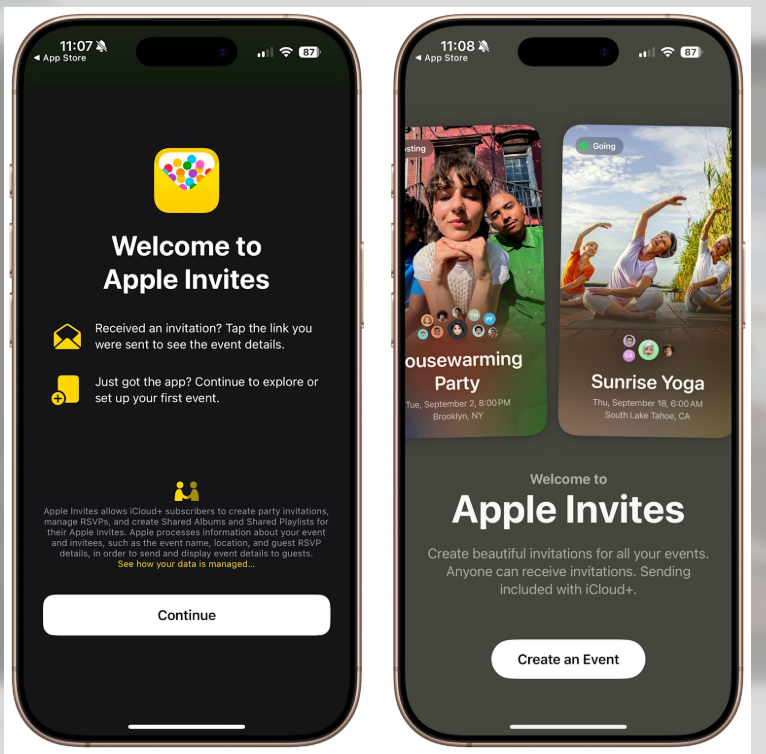
This is where the application comes in. Mails were sent using individual links rather than a single link. In such a manner I was aware of just who received what. The app would extract contacts directly out of my phone and everybody was sent a clean iMessage card with the following RSVP buttons; Going, Maybe, or Not going.
My Android friends were even able to reply to an invite by use of a web address iCloud.com/invites. They were not required to have an Apple ID but rather a verified email. That was a surprise to me- Apple actually created something that is not in its own ecosystem.
Several minutes later replies began to come through and live RSVP tracker was automatically updated. There is no necessity to use spreadsheets or group chats with messages and pictures like Who is coming?
Sharing Memories and Music
Connection to a shared album of photos was one of the most successful things where each could post photos following the party. This was linked to Apple Photos application and hence all the photos were in a single location.
The next thing I found was a secret treasure the collaborative playlists on Apple Music. The guests were allowed to add songs either prior to or on the event. It turned into a pre party game and by the evening we had the exact balance of the old hits with the crazy requests.
And in case you enjoy such types of integrations, they also describe the process in WIRED in their practical guide.
Small Glitches (Because Nothing’s Perfect).
A few problems happened. The app became slow when I added over a hundred contacts. It is okay when the number is small but not large crowd events. Either, no one can edit the RSVP of somebody manually, and it was quite awkward when a friend sent a text, saying, “I can come by the way, however, as it happens, now I can come too.
I also believe that iCloud+ must is a minor hurdle. Similar tools such as Partiful or Eventbrite allow creating events with no cost, and I would like Apple to have only a limited free version.
The Aftermath – Was It Worth It?
Honestly, yes. The Apple Invites app was user-friendly, tidy, and entertaining to use when planning my party. Everything was tied together with the integration with the Maps, Calendar and Music. I did not have to balance five applications nor I had to worry about guests missing out on information.
Would I use it again? Definitely, in case of personal events. Hardly, at the moment when it comes to a big event or a professional event. The secret behind the app is that it makes the small get-togethers feel special without complicating matters too much.
The official newsroom announcement by Apple outlines the philosophy of the app effectively, in the event you are interested. However, there is no better way of knowing, as it is by hosting.
My Final Take
The Apple Invites application is not the run of the mill product full of features but a handy device provided you are inside the Apple world. Sending invites, sharing playlists and photos, it strikes the social tone without any effort.
The scalability could be enhanced, the inclusion of Apple Wallet (paid events) may be considered, and certainly something to change RSVPs. But for now, it’s a good start. In case you own an iPhone and you are going to an event, have a go. P.S. Better be careful, you can even hold more parties to utilize it.
Also Read:

I’m a technology writer with a passion for AI and digital marketing. I create engaging and useful content that bridges the gap between complex technology concepts and digital technologies. My writing makes the process easy and curious. and encourage participation I continue to research innovation and technology. Let’s connect and talk technology!


