Last updated on December 20th, 2025 at 03:29 pm
Indoor streaming is one thing but when you are standing in a field where there is no signal and your phone batteries are almost empty, it becomes a different story. This is how to make it actually work.
I have watched too many streams fail to stream through because someone had thought that their phone hot-spot would cut out. Spoiler: it won’t. However, here is the point, you do not need a production truck to drag quality outdoor broadcasts. All you have to do is know what breaks and how to make it work then go live.
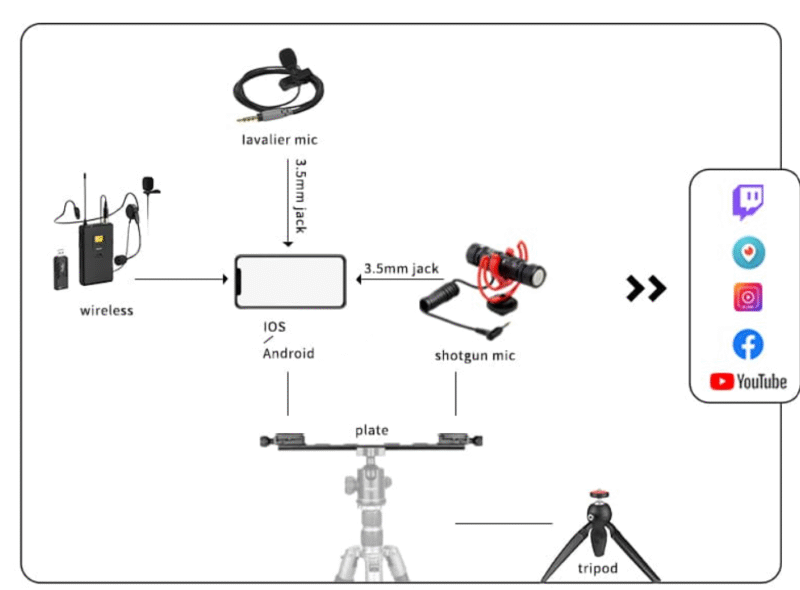
Table of Contents
Begin With Your Internet (Because Without It, Everything Else is Pointless).
The following is the bargain: minimum upload speed of 2-5 Mbps to stream basic 720p. Note that I have uploaded, not downloaded. Majority of the people look at the download speed and ask themselves why their stream appears to be a pixelated image.
At 1080 p and 60fps, the minimum data rate would be 4-5 Mbps. I never leave the buffer less than 20 percent since outdoor signals always find a way to go down at any time.
Your best options:
- Mobile hotspot (4G/LTE): It is quite effective in cities. Get 5- 15 Mbps upload when you are lucky. Try it out at the place of your action prior to the event.
- Cellular bonding routers: assemble several SIM cards of different carriers. More expensive, but you can have 20-40 Mbps and effective redundancy on failure of one carrier.
- Starlink: When you need to stream in the wilderness, here is the time to act. It is more expensive in the short run and provides 10-30 Mbps upload with low latency astonishingly well today.
Don’t rely on public Wi-Fi. Just don’t.
Camera Set-Up: It Doesn’t Need to Be Complicated
The beginning can be with a smartphone. Seriously. Even the phones today are excellent at taking video and as long as your internet connection is good you are 80 percent there.
However, when you need it to be flexible, use a mirrorless or DSLR. Action cameras also work–particularly when you are engaged in some type of activity such as sports or hiking streams.
It is stability that is of greater importance than the camera itself. The wind, the uneven ground and people bumping into your setup would get your shot ruined more than bad lighting. Use a nice tripod and load it with sandbags in case it is a windy day.
When you are using more than one camera, have a wide shot in reserve. That master shot can rescue you when other cameras are rearranged when you are switching the angles.
Audio is Where Most People Fail
The noise of wind eliminates out-of-doors sound. I have also watched streams, in which nothing was audible but puffing wind 10 min at a time.
Quick fixes:
- Windscreen mics (they do resemble fuzzy dead animals): Necessary. Period.
- Lavalier windscreens: Stick them on your interviewee, but not in the wind.
- A wireless audio system: In case your subject is mobile, then you require wireless. Wired microphones are a nightmare when used outdoors.
When feasible, place your mic in a non-windy position. In other cases, merely turning it about is the cure of 90 percent of your ills.
The Power Management
Outdoors, batteries are drained quicker. Cold, heat, and regular connectivity are all power consuming.
Carry battery packs- large ones. A backup power solution is necessary in case you are streaming longer than two hours. Portable generators (get one with a low noise level such as the Honda EU2200i) can be used, or invest in high capacity battery systems.
Hot tip: hot-swappable batteries allow you to switch between power sources without pausing your stream.
Weather Protection is not an option.
Bad weather, dust and changes of temperature will ruin your equipment. Although the forecast may appear clear, include:
- Cameras have waterproof covers.
- Cases of encoders and routers which are weather resistant.
- An easy-to-set up pop-up tent or shelter.
- Outdoor rated cables (indoor cables cannot work when wet)
I have witnessed a drizzle drifting over a 5000 dollar camera setup. Don’t let that be you.
Pre-Event Testing Saves Everything
Survey where you are going before. Check internet connectivity, test internet connectivity, and find sources of power.
Conduct a complete technology rehearsal 24 hours prior to the event. Connect all and stream 10 minutes privately and observe complications.
The majority of streaming disasters occur due to the failure of an individual to take this step.
Platform Choice
YouTube Live is free and is effective to majority. Facebook Live is logical when there is an audience present. Gaming-related content adjacent to twitch.
White-label platforms such as Dacast have more options when you need to have branding control (they require money however).
FAQ’s
Q: Can I really stream outdoors with just my phone and a hotspot?
Yes, but just in places where the coverage is good 4G/LTE. The first thing to do is to test your upload speed there with a speed test application. With 3Mbps (or above) uploads that are constant, you can stream at 720p.
Now they are not going to get miraculated in the country or in big halls where everybody is banging on the same cell tower.
Q: What’s the biggest mistake beginners make with outdoor streaming?
Giving all their internet without considering its proper functioning. I have seen people come to the events, go live and immediately notice that they have 0.5 Mbps upload. Never leave without reconnoitering beforehand and never leave without running connection tests. Carry spare hotspots of other carriers in case you have to do anything.
Q: How much should I budget for basic outdoor streaming gear?
You will only need to begin below 500 in case you have a good smartphone. Include a mobile hot spot of between 100-150, a windscreen mic of 50 and a simple tripod of 30. To upgrade, a mirrorless camera would cost 600-1200 and cellular bonding routers have an entry price of about 500-800.
Specify your budget on the frequency of streaming and the monetization of the stream.
Read:
EA FC 26 Showdown Tracker: Game-Changing Updates You Need to Know

I’m a technology writer with a passion for AI and digital marketing. I create engaging and useful content that bridges the gap between complex technology concepts and digital technologies. My writing makes the process easy and curious. and encourage participation I continue to research innovation and technology. Let’s connect and talk technology!


