
The vast majority of engineering teams use GitHub more like a file cabinet, with its contents organized well up, instantiating code, setting up a pipeline, and leaving the settings page mostly untouched. Such a solution proved rational when GitHub was only version control. It is now a liability that GitHub is in the middle of the code construction, testing, and delivery to the actual production.
GitHub Security: Protecting Repositories, Actions and Apps never required developers, Dev Ops engineers and even security teams per se. The platform has more than 100 million developers, has a CI/CD pipelines that interact with cloud infrastructure, and contains secrets that open production systems.
It is precisely this kind of concentration of access that makes it a high-value target in 2026. This guide discusses the location of the actual exposure as well as what control actually minimizes the risk.
Table of Contents
GitHub as a 2026 Attack Surface: Apps, Actions & Contributors
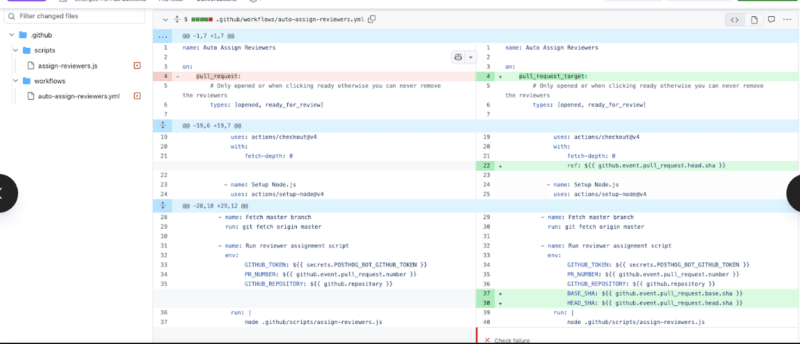
The current GitHub attack does not present itself. It does not appear like a forceful entry or database dump. It appears as a reliable workflow that executes familiar looking steps that silently emanate a cloud credential in the process of a pull request build. Or a GitHub App that was sanctioned two years prior, and now controlled by a third party, in the organization environment, and has write access to all repositories.
The threat landscape is characterized by three surfaces, and each of them has a risk profile of a different nature.
The silent exposure is GitHub apps and OAuth apps. A great many of them have been installed many years earlier with permissions that were much more liberal than the actual application needed. Programmers do not stick around, teams switch and those applications linger, never checked on, always retaining the tokens. The company lacks an automatic tool to uncover stagnant or over-permitted apps without a person searching.
The most vulnerable point attacked in 2026 is GitHub Actions workflows. Actions is functioning as a type of remote code execution, which operates within the infrastructure of GitHub, and accesses cloud provider credentials, deployment keys, and package registry tokens in many cases.
Can be defeated due to misconfigurations Overly-wide GITHUB_TOKEN, an unfixed third-party call, a workflow that opens uncritically taking code on forked pull requests, etc.
The human layer is that of contributor accounts. Phishing attacks on developers have become more focused and more believable. A compromised contributor account which has merge rights or access to the environment is a straight access point into the codebase and there to whatever is deployed to.
Actual patterns of attack: The 2025 tj-actions supply chain attack did not break any encryption. Hackers obtained a valid GitHub Actions token and applied it to add rogue actions to downstream workflows - measuring in the thousands of repositories who had implicitly or expressly trusted a tag of an action alia which was pointing somewhere other than that action.
One thing that I observed as I went over post-mortems of with a few incidents related to GitHub was that the theme in common was not a complex zero-day exploit. It was excessively authorised token, an authorisation lapsed on an app, or a workflow file that had not been reviewed within a year. There is no exotic attack surface any more, it is unattended.
Why the Threat Model Changed
What changed in 2022 to 2026 was no longer the security posture of GitHub but the degree of security improved to a level much higher. Attacker incentive is what has changed.
Since organizations have shifted all the deployment lifecycle of their organization to GitHub Actions and can now directly ship to AWS, GCP and Azure as the result of a workflow run, GitHub turned into the control plane of production. Intercept the pipeline, and in most architectures there is an obvious way to production infrastructure.
| Attack Surface | Primary Risk | Blast Radius |
|---|---|---|
| GitHub Actions Workflows | Secret exfiltration, step injection | Full pipeline + cloud credentials |
| Third-Party GitHub Apps | Over-broad permissions, stale tokens | Org-wide repository access |
| OAuth Apps | Excessive scopes, no org restrictions | Private repo exposure + webhook data |
| Contributor Accounts | Phishing, credential stuffing | Codebase integrity, merge approvals |
| Default Repo Settings | No branch rules, unsigned commits | Unauthorized code reaching production |
Repository Hardening: Branch Protection, Required Reviews & Signed Commits
All the risk deposits in the repository. All the lines going through production go through it. A newly created GitHub repository barely has any defensive defaults, and most organizations only set what is necessary to just start CI running and never go to the settings page again.
So far, I have applied the branch protection policies at GitHub to dozens of different projects, both open-source solo and using multi-team enterprise settings. The difference between a default and a hardened repository is wide – and it can be closed within less than ten minutes per repository.
Branch Protection Rules That Actually Matter
Branch protection policies are relevant to any branch yet most importantly to a main, release/*, and the branch that is triggered by a deployment. The following settings can be taken as a plausible beginning:
- Pre whose conditions are satisfactory before merging– have no fewer than two approvals on production-related branches. A socially gameable reviewer is a person who can be under deadline pressure and perform a genuine accountability; two reviewers make it happen.
- Reject stale pull request approvals with new commits being pushed, through it is harder to achieve due to the frequent pattern of receiving an approval on a clean commit, and pushing a dirty version until the merge window expires.
- Prerequisite status checks before merging – make CI tests, linting, and security scanning directly merge eligible. A PR which fails to break a test or even a secret scan will not be allowed to merge until the problem is fixed.
- Stop direct push access to corresponding branches – even administrators are supposed to go through the pull requests in guarded branches. One of the most widely used gaps is that of admin bypass.
- Branch deletions / block force Rewriting attacks Force Pushes – Closes the history-rewriting attack, consisting of adding a malicious commit and then un-adding it before anyone checks the diff.
To organizations that operate an array of repositories, Repository Rulesets (on Team and Enterprise packages) on GitHub give the opportunity to centrally apply such settings to a whole organization and not to each repository separately.
To have the complete picture of what each tier of plan has to offer, the documentation of security functions that GitHub incorporates can be used to map every single tool visually.
CODEOWNERS: Putting the Right Eyes on the Right Files
The needed reviews can only be effective when they are being conducted by the correct individuals. The CODEOWNERS file is an automated file to assign the review of the files which have been touched by a pull request. It resides in .github/CODEOWNERS and falls under path pattern:
*.yml        @security-team
/src/auth/   @auth-leads @security-team
/infra/      @platform-eng
Any PR that reaches GitHub Actions workflow files will automatically have the security team as readers – they will not have to get them tagged manually or any gaps in coverage.
My experience indicated that workflow files within.github/workflows/ would be the most missed entrant in CODEOWNERS configurations. With such entry, a developer is able to add a new third-party action with wide-ranging permissions – or even alter an existing step to examine environment variables – without being reviewed by someone with security knowledge. That gap is bridged in one line of CODEOWNERS.
I Tested Signed Commits – Here’s Why Teams Skip Them and Shouldn’t
By signing commit, cryptographic evidence is given that the commitment was signed by the nominated signatory. And without it, author field in a Git commit is literally a string, any repository write-accessible person can become an author of a commit with any name or email address they select. Not just hypothetical but this can be trivially attacked in any repository without checking the signature.
GitHub has now native SSH key signing at the expense of the GPG it used to make this complicated the unfriendly aspect of signing keys. Installation time: less than five minutes:
- To configure gpg format as SSH format; run: git config gpg.format ssh.
- Identity Add the SSH key to GitHub on Settings – S everywhere – SSH and GPG Keys – New Signing Key.
- лосьteen branches Setting = Use signed commits: dans colleges sous la protection du branch.
Signed commits in teams operating under Software Supply Chain Security models like SLSA or the NIST Software Supply Chain Security: Secure Software Development Framework are a mandatory Level 2 and Level 3 control – and therefore is a compliance checkpoint, more than a security control.
Securing GitHub Actions Workflows: Secret Management & Approval Gates
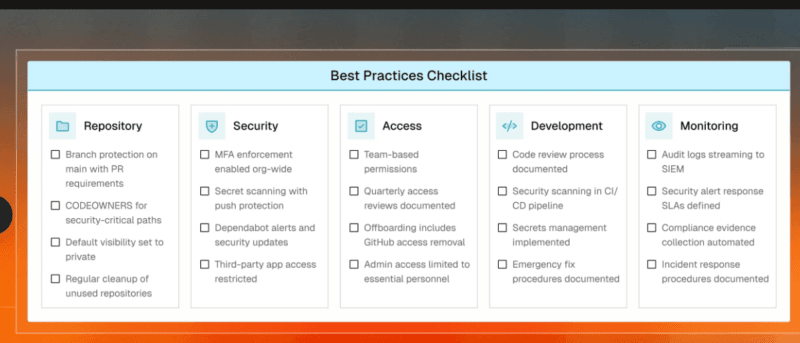
GitHub Actions is remote code us manufacturing within the Narco presenter of GitHub. The fact that framing is important is that it decides the security posture that is needed. Workflows also execute arbitrary code with a possibility of having access to cloud credentials, package registry tokens, deployment keys, and API secrets. The features of the platform are not configured to that access.
I sampled examples of popular open-source workflow setups, and found that most of them can be characterized in three ways: excessively broad permissions of GITHUB_TOKEN, third-party actions under mutable version tags instead of specific SHAs, or secrets built in accessible to workflows that are triggered by pull requests of forks.
Scoping GITHUB_TOKEN to the Minimum Required
The default GITHUB_TOKEN injected into each workflow execution had write access by default in most of the repositories. An endangered or rogue workflow step inherits such access. The fix is explicit and limited scoping of permission both at the workflow and job level:
# Top-level workflow default — deny everything first
permissions: {}

jobs:
  deploy:
    permissions:
      contents: read
      id-token: write    # Only if OIDC is needed
Error: Clear out the default of the highest level. Then provide just what any job requires, and nothing remains unspoken. GitGuardian lacks opinionated advice to assist the reader: the GitHub Actions security cheat sheet includes one set of token scoping and secret management with pinning strategy and runner isolation tips, along with examples of different workflow patterns, in a single page.
Pinning Actions to Commit SHAs, Not Tags
Actions/checkout is readable using actions/checkoutv4. Another trust assumption of this variety is that the v4 tag will never point to some other commit (unmodified). Tags are mutable. Where a trusted tag held a trusted value, the tj-actions incidence saw the transfer of that tag mute-poke to a trusted commit, and each workflow containing such a tag started executing malicious code on the subsequent build.
A full commit SHA pin will ensure that this assumption is never again made:
uses: actions/checkout@11bd71901bbe5b1630ceea73d27597364c9af683 # v4.2.2A SHA is a single commit commitment that is permanent. Those in-text remarks are not lost to human readability. Dependabot on Actions automatically updates SHAs with the release of new versions – automatically creating pull requests, so it does not require much time to maintain it manually.
I had observed that the teams that move to SHA pinning are initially concerned by maintenance burden. Practically, the solution to this, provided to Actions by enabling Dependabot, is a complete solution. Security enhancement is operationally free except the fact that Dependabot has to be installed.
OIDC Federation – Eliminating Stored Cloud Credentials
The most popular cloud deployments pattern with Actions is the usage of cloud provider credentials as GitHub Secrets AWS access keys GCP service account JSON Azure client secrets. It is a long-term authority risk too. In case a secret has been spilled over a log line, an incorrectly configured step, or by a compromised marketplace activity, it will be valid until either it is discovered and changed by hand.
The openusaID federation is an incarnation of the openID federation that instead of storing identity credentials, it uses workload-specific short-lived tokens. It is proved with the help of the workflow that it is a valid GitHub Actions run and the cloud provider grants the temporary credential, limited to that particular job. No stored secret is required.
The most important peculiarities of OIDC-issued tokens are:
- Auto-expire, normally after 60 minutes of issuing.
- Limited to particular repositories, branch names or GitHub Environment names.
- No qualifications to spin, accidentally log, commit, or spill over a mishandled activity.
OIDC is a native entity in AWS, GCP, and Azure, and since companies that use these services already have existing stored secrets, moving to OIDC is a half-day effort.
Environment Protection Rules and Human Approval Gates
GitHub Environments enable the teams to make the deployment behind necessary human approvals. No workflow can be deployed to a production site without a qualified reviewer directing the deployment by explicitly approving the run. It is easy to be set up: Repository – Settings – Environments – Create Environment – Add Requirement Reviewers.
Even a wait timer of five minutes provides teams with the necessary time to cancel unexpected or unplanned deployments runs before they finish. Bringing about the environment protection and deployment branch policy limits which branches are able to initiate deployments to which environment. Only main pushes to production. Functional branches are made to staging. The combination is a non-existence of a whole group of unplanned and illegal deployments of the production.
I have applied environment protection rules in various team configurations and have determined that teams enforcing them intercept a substantial portion of unintended deployments, which would otherwise pass unnoticed and on automatic pipelines.
Third-Party App Vetting and Permission Auditing
The flank that is overlooked in GitHub security is third-party apps. A developer can install an item within thirty seconds that provides him/her write access to all organization repositories and forget about it. Several months down the line, that application can have been sold, bear a haciendas token, or be an entry point into an organization that nobody has been examining since the developer who approved it left.
It is the difference between GitHub Apps and OAuth apps that is of practical concern. GitHub Apps operate on limited-access permissions, temporary installer tokens and repository-scoped access – and means that the blast radius is highly reduced in the event of a credentials breach. OAuth applications use long-lived user tokens, usually with wide-ranging permissions such as repo access or access to admin:org access, and access that significantly exceeds that demanded in most use cases.
How to Run a Third-Party App Audit Right Now
- Organization Settings– GitHub Apps- view all installed applications. For each: Who published it? When was it last active? What rights does it have permission to? Is there any change of ownership of the publishing entity?
- Setting in organization – OAuth App Access to Authorizations – laws to enable the limitation, in case it is not active. This authenticates all subsequent OAuth authorizations of personal organization information behind express owner consent.
- Personal Settings – Applications – Authorized OAuth Apps – make each and every member of the organization revise their individual OAuth authorizations. Anything that is unfamiliar, has been idle for 90 or more days, or has permissions broader than what is described as being utilized in the stated use case, is revoked.
- Verify last-used dates on all approved applications – any application where no activity has been done in 90 days or longer must be revisited and in most instances cancelled.
During a regular review of the GitHub organizational settings to a mid-size development team, I stumbled upon three OAuth applications that each had all the repo scopes in the entire organization, and no activity was recorded in more than 18 months, and the original authorizing accounts of these applications were no longer in the organization. All this was not going to come out without making a specific search.
What to Evaluate Before Approving Any New App
Any app approval to an organization must undergo a regular check before a permission is granted:
- Publisher verification– is the app published by a well-known organization or a substantiated market place publisher? Unauthenticated personal users should have much more scrutiny towards org level access.
- Scope justification– is there a documented justification of each permission requested? Any application that requests a request to an organisation and deletes a repo or writes to packages without providing a convincing explanation must be rejected.
- Type of token GitHub App with OAuth app is preferable heavily when presented with an option. When an app exclusively uses OAuth only provide a set of as few scopes that the use case truly needs.
- Transparency of data flows The app transmits the content of a repository to other servers? In the event that they are, Data Processing should be outlined by a vendor DPA and checked with related policies of handling data.
- Security disclosure policy is the vendor releasing a responsible disclosure policy or does it have a bug bounty program? Those vendors who declare security contact are significantly more accountable of enterprise level.
| Dimension | GitHub Apps | OAuth Apps |
|---|---|---|
| Token lifespan | Short-lived installation tokens (≤1 hour) | Long-lived user access tokens |
| Permission scope | Fine-grained, per-permission grants | Broad scope buckets (repo, admin:org) |
| Repository access | Specific repos selected at install time | All repos the authorizing user can access |
| Org-level control | Owner manages directly | Requires OAuth access restrictions setting |
| Recommended for | Integrations, automation, CI/CD tools | Legacy integrations – migrate where possible |
GitHub Security and Software Supply Chain Security: The Bigger Picture
Signed commits and pinned actions, OIDC credentials and app permission audits all address a particular gap. They best serve to be perceived as multi-layered layers of a larger posture opposed to separate boxes to be checked.
Software Supply Chain: Security Software Supply Chain Security is defined as the process of ensuring all these components, processes and dependencies, touching code enjoys appropriate security measures both during the writing of code and during the execution of the code in actual use.
Most development teams have GitHub at the middle of that chain. The platform is intersected by the source code, build automation, dependency management, deployment triggers, and the third-party tooling. Hardening of GitHub is not independent of Software Supply Chain Security – it is essential now part of it.
The tooling of the GitHub company has developed much to reflect this. Dependabot warnings, pull request dependency review, push protected secret scanning, and Copilot Autofix alert upon code scanning have now meaningful coverage of the repository layer. The difference most of the teams encounter is not the availability of tools, but rather configuration. The controls exist. They are switched off, incorrectly scoped and not linked to enforcement.
Current state viewing: Can the block scanning of secrets with pushing the safeguard on all repositories that interact with production credentials. Turn up Dependabot warnings and dependency inspection on PRs which update package.json, requirements.txt or similar dependency files. The three steps represent the most frequent highest-impact repository-layer risks - and all three are omnipresent in public repositories, included in GitHub Team and Enterprise plans of private repositories.
What I’d Do First If Starting a Security Review Today
Having so much GitHub security guidance in 2026 will be enough to cause one to think that the problem is giant. Practically, a dedicated four-hour meeting can seal most of the most dangerous gaps of the most repositories.
Begin with the worksibling of production safety branches – set up branch protection measures, add CODEOWNERS entries on workflow files, make them subject to status references. Then go into the list of installed apps in the organization and revoke anything that is not used, not recognized or unrecognized as well as unauthorized access.
Workflows Move to Actions This workflow contents workflows that are used to finish: you are more specific with the permissions in GITHUB_TOKEN, pin each third-party action on a SHA, and decouple any existing stored cloud credentials with OIDC federation. Lastly, even allow environment protection regulations with necessary human authorizations towards production deployments.
My experience demonstrated that even organizations that had the most substantial security budgets and the most advanced tooling were not typically the most comprehendive regarding their GitHub security endeavor. It was they who applied the same discipline to GitHub configuration that they engaged in to application code reviewed regularly, audited periodically and never left on platform defaults.
The controls are given in the platform. The problem is whether or not they are configured actually.

I’m a technology writer with a passion for AI and digital marketing. I create engaging and useful content that bridges the gap between complex technology concepts and digital technologies. My writing makes the process easy and curious. and encourage participation I continue to research innovation and technology. Let’s connect and talk technology!


