
Last updated on September 21st, 2026 at 08:47 am
Most engineering teams use GitHub more like a file cabinet, with well-organized contents, instantiating code, setting up a pipeline, and leaving the settings page mostly untouched. This approach made sense when GitHub was only version control. Now, GitHub is in the middle of code construction, testing, and delivery to production.
GitHub Security: Protecting Repositories, Actions, and Apps never required developers, DevOps engineers, and even security teams per se. The platform has more than 100 million developers, has CI/CD pipelines that interact with cloud infrastructure, and contains secrets that open production systems.
This kind of concentration of access makes it a high-value target in 2026. This guide discusses where the real exposure lies and what controls best minimize the risk.
Table of Contents
GitHub as a 2026 Attack Surface: Apps, Actions & Contributors
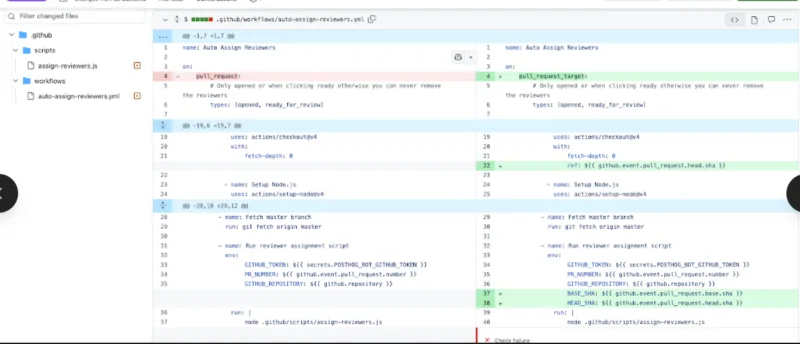
The current GitHub attack does not present itself. It doesn’t look like a forceful entry or database dump. It looks like a reliable workflow that runs familiar steps and silently leaks a cloud credential during a pull request build. Or a GitHub App that was sanctioned two years prior and now controlled by a third party, in the organization environment, and has write access to all repositories.
The threat landscape has three surfaces, and each has a different risk profile.
Silent exposure includes GitHub apps and OAuth apps. Many were installed years ago with permissions far broader than the application needed. Programmers do not stick around, teams switch, and those applications linger, never checked on, always retaining the tokens. The company lacks an automated tool to uncover stagnant or over-permitted apps without manual searching.
The most vulnerable point attacked in 2026 is GitHub Actions workflows. Actions function as a form of remote code execution within GitHub’s infrastructure and, in many cases, access cloud provider credentials, deployment keys, and package registry tokens.
Misconfigurations can defeat it: Overly Wide GITHUB_TOKEN permissions, an unfixed third-party call, a workflow that uncritically accepts code from forked pull requests, etc.
The human layer is that of contributor accounts. Phishing attacks on developers have become more focused and more believable. A compromised contributor account with merge rights or environment access is a direct access point into the codebase and whatever is deployed.
Actual patterns of attack: The 2025 tj-actions supply chain attack did not break any encryption. Hackers obtained a valid GitHub Actions token and used it to add rogue actions to downstream workflows, affecting thousands of repositories that had implicitly or expressly trusted an action tag that pointed somewhere other than that action.
One thing I observed while reviewing post-mortems of a few GitHub incidents was that the common theme wasn’t a complex zero-day exploit. It was an over-authorized token, an authorization that had lapsed on an app, or a workflow file that hadn’t been updated in a year. There is no exotic attack surface anymore; it is unattended.
Why the Threat Model Changed
What changed from 2022 to 2026 was not GitHub’s security posture, but the degree to which security improved to a much higher level. Attacker incentives are what have changed.
Since organizations have shifted their entire deployment lifecycle to GitHub Actions and can now directly ship to AWS, GCP, and Azure as a result of a workflow run, GitHub has become the production control plane. Intercept the pipeline, and in most architectures there is an obvious way to production infrastructure.
| Attack Surface | Primary Risk | Blast Radius |
|---|---|---|
| GitHub Actions Workflows | Secret exfiltration, step injection | Full pipeline + cloud credentials |
| Third-Party GitHub Apps | Over-broad permissions, stale tokens | Org-wide repository access |
| OAuth Apps | Excessive scopes, no org restrictions | Private repo exposure + webhook data |
| Contributor Accounts | Phishing, credential stuffing | Codebase integrity, merge approvals |
| Default Repo Settings | No branch rules, unsigned commits | Unauthorized code reaching production |
Repository Hardening: Branch Protection, Required Reviews & Signed Commits
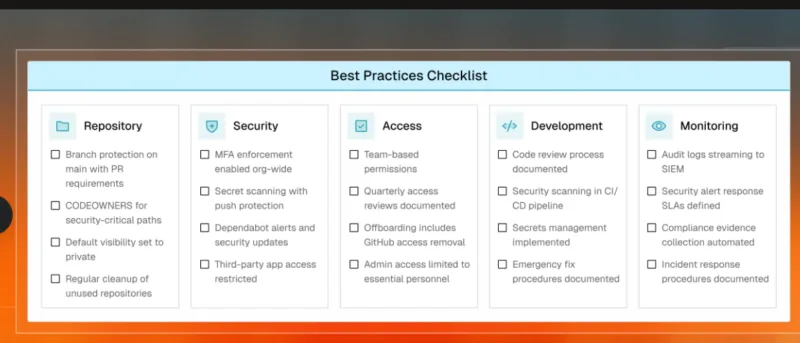
All the risk deposits in the repository. All the lines going through production go through it. A newly created GitHub repository barely has any defensive defaults, and most organizations only set what is necessary to start CI running and never go to the settings page again.
So far, I have applied branch protection policies in GitHub to dozens of projects, both open-source solo and multi-team enterprise. The difference between a default and a hardened repository is wide – and it can be closed within less than ten minutes per repository.
Branch Protection Rules That Actually Matter
Branch protection policies are relevant to any branch yet most importantly to a main, release/*, and the branch that is triggered by a deployment. The following settings can be taken as a plausible beginning:
- Pre-merge conditions: require at least two approvals on production-related branches. A socially gameable reviewer is someone who can stay accountable under deadline pressure; two reviewers make it happen.
- Reject stale pull request approvals when new commits are pushed; this is harder to achieve because approvals often come on a clean commit, then the author pushes a dirty version before the merge window expires.
- Prerequisite status checks before merging – make CI tests, linting, and security scanning merge-eligible. A PR that fails to pass a test or even a secret scan will not be allowed to merge until the problem is fixed.
- Stop direct push access to corresponding branches – even administrators are supposed to go through the pull requests in guarded branches. One of the most common gaps is admin bypass.
- Branch deletions/block force-push rewriting attacks: Force Pushes – Closes the history-rewriting attack, consisting of adding a malicious commit and then un-adding it before anyone checks the diff.
For organizations that operate an array of repositories, Repository Rulesets (on Team and Enterprise packages) let you apply these settings centrally across an organization rather than to each repository separately.
To get a complete picture of what each plan tier offers, you can use GitHub’s security-function documentation to map every tool visually.
CODEOWNERS: Putting the Right Eyes on the Right Files
Reviews are only effective when the right people conduct them. The CODEOWNERS file automatically assigns reviews for the files touched by a pull request. It resides in .github/CODEOWNERS and falls under the path pattern:
*.yml        @security-team
/src/auth/   @auth-leads @security-team
/infra/      @platform-eng
Any PR that reaches GitHub Actions workflow files will automatically have the security team as readers – they will not have to get them tagged manually, or leave any gaps in coverage.
My experience suggests that workflow files in .github/workflows/are the most commonly missed entries in CODEOWNERS configurations. With such an entry, a developer can add a new third-party action with wide-ranging permissions – or even alter an existing step to examine environment variables – without being reviewed by someone with security knowledge. One line of CODEOWNERS bridges that gap.
I Tested Signed Commits – Here’s Why Teams Skip Them and Shouldn’t
Signing a commit provides cryptographic evidence that the nominated signatory signed it. Without it, the author field in a Git commit is literally a string; any repository write-accessible person can become an author of a commit with any name or email address they choose. This isn’t hypothetical; you can trivially attack it in any repository without signature checks.
GitHub now supports native SSH key signing, which replaces GPG and makes signing less complicated. Installation time: less than five minutes:
- To configure GPG format as SSH format, run: git config gpg. format ssh.
- Identity: Add the SSH key to GitHub in Settings – SSH and GPG Keys – New Signing Key.
- Team branches: Setting = Use signed commits: dans les branches protégées.
Signed commits in teams operating under Software Supply Chain Security models like SLSA or the NIST Software Supply Chain Security: Secure Software Development Framework are a mandatory Level 2 and Level 3 control – and therefore are a compliance checkpoint, more than a security control.
Securing GitHub Actions Workflows: Secret Management & Approval Gates
GitHub Actions enables remote code execution within the GitHub runner. The key point is that it determines the required security posture. Workflows also run arbitrary code and may access cloud credentials, package registry tokens, deployment keys, and API secrets. The platform’s features are not configured for that access.
I sampled examples of popular open-source workflow setups. I found that most fall into three categories: excessively broad GITHUB_TOKEN permissions, third-party actions under mutable version tags instead of specific SHAs, or secrets built in and accessible to workflows triggered by pull requests from forks.
Scoping GITHUB_TOKEN to the Minimum Required
The default GITHUB_TOKEN injected into each workflow execution had write access by default in most of the repositories. An endangered or rogue workflow step inherits such access. The fix is explicit and limited scoping of permissions both at the workflow and job level:
Top-level workflow default — deny everything first.
permissions: {}jobs:
deploy:
permissions:
contents: read
id-token: write # Only if OIDC is neededError: Clear out the default at the highest level. Then provide only what each job requires, and leave nothing unsaid. GitGuardian lacks opinionated advice to assist the reader: the GitHub Actions security cheat sheet includes one set of token scoping and secret management with pinning strategy and runner isolation tips, along with examples of different workflow patterns, in a single page.
Pinning Actions to Commit SHAs, Not Tags
Actions/checkout is readable as actions/checkout v4. Another trust assumption of this variety is that the v4 tag will never point to some other commit (unmodified). Tags are mutable. Where a trusted tag held a trusted value, the tj-actions incident saw that tag mutate to point to a trusted commit, and each workflow containing that tag started executing malicious code on the next build.
A full commit SHA pin will ensure that this assumption is never again made:
uses: actions/checkout@11bd71901bbe5b1630ceea73d27597364c9af683 # v4.2.2A SHA is a single, permanent commit. Those in-text remarks are not lost to human readability. Dependabot in Actions automatically updates SHAs when new versions are released and creates pull requests, so it requires little manual maintenance.
I have observed that the teams that move to SHA pinning are initially concerned about the maintenance burden. In practice, enabling Dependabot in Actions provides a complete solution. The security enhancement is operationally free, except that you must install Dependabot.
OIDC Federation – Eliminating Stored Cloud Credentials
The most popular cloud deployment pattern with Actions is using cloud provider credentials as GitHub Secrets: AWS access keys, GCP service account JSON, and Azure client secrets. This is also a long-term authority risk. If a secret is spilled in a log line, an incorrectly configured step, or through compromised marketplace activity, it remains valid until someone discovers it and changes it manually.
The openusaID federation is an incarnation of the OpenID federation that, instead of storing identity credentials, uses workload-specific short-lived tokens. It proves, through the workflow, that it is a valid GitHub Actions run, and the cloud provider grants a temporary credential limited to that job. No stored secret is required.
The most important peculiarities of OIDC-issued tokens are:
They auto-expire, typically after 60 minutes.
They’re limited to specific repositories, branch names, or GitHub Environment names.
No risk of accidentally logging, committing, or spilling over a mishandled activity.
OIDC is a native entity in AWS, GCP, and Azure, and since companies using these services already have stored secrets, moving to OIDC is a half-day effort.
Environment Protection Rules and Human Approval Gates
GitHub Environments lets you add mandatory human approvals. No workflow can deploy to a production site without a qualified reviewer explicitly approving the run. It is easy to set up: Repository – Settings – Environments – Create Environment – Add Requirement Reviewers.
Even a five-minute wait timer gives teams enough time to cancel unexpected or unplanned deployment runs before they finish. This enables environment protection and deployment branch policy limits, which define which branches can initiate deployments to which environment. Only main pushes to production. Functional branches are made to staging. Together, they prevent unplanned, unauthorized deployments to production.
I have applied environment protection rules in various team configurations and found that teams enforcing them intercept a substantial portion of unintended deployments that would otherwise pass unnoticed through automated pipelines.
Third-Party App Vetting and Permission Auditing
The overlooked flank in GitHub security is third-party apps. A developer can install an item within thirty seconds that provides them write access to all organization repositories and forget about it. Several months later, that application may have been sold, become an entry point into an organization that nobody has examined, or the developer who approved it may have left.
The practical difference is between GitHub Apps and OAuth apps. GitHub Apps operate on limited-access permissions, temporary installer tokens, and repository-scoped access – which means that the blast radius is highly reduced in the event of a credentials breach. OAuth applications use long-lived user tokens, usually with wide-ranging permissions such as repo access or dmin: org access, and access that often exceeds what most use cases demand.
How to Run a Third-Party App Audit Right Now
- Organization Settings – GitHub Apps: view all installed applications. For each: Who published it? When was it last active? What permissions does it have? Is there any change of ownership of the publishing entity?
- Setting in organization – OAuth App Access to Authorizations – laws to enable the limitation, in case it is not active. This authenticates all subsequent OAuth authorizations for personal organization information, with the owner’s express consent.
- Personal Settings – Applications – Authorized OAuth Apps – have each organization member review their individual OAuth authorizations. Anything unfamiliar, that has been idle for 90 or more days, or has permissions broader than what is described as being utilized in the stated use case, is revoked.
- Verify last-used dates on all approved applications – any application where no activity has been done in 90 days or longer must be revisited and, in most instances, canceled.
During a regular review of GitHub organizational settings for a mid-size development team, I found three OAuth applications that each had all repo scopes across the organization, no activity in more than 18 months, and original authorizing accounts that were no longer in the organization. None of this would surface without a targeted search.
What to Evaluate Before Approving Any New App
Any app approval to an organization must undergo a regular check before a permission is granted:
- Publisher verification– is the app published by a well-known organization or a substantiated marketplace publisher? Unauthenticated personal users should have much more scrutiny for org-level access.
- Scope justification– is there a documented justification of each permission requested? Reject any application that requests access to an organization and deletes a repo or writes to packages without a convincing explanation.
- A GitHub App token is strongly preferred over an OAuth app token when both are available. When an app uses OAuth, provide only the scopes the use case truly needs.
- Transparency of data flows: Does t: Does the app transmit repository content to other servers? If they are, Data Processing should be outlined by a vendor DPA and checked with related policies for handling data.
- Security disclosure policy: Is the vendor releasing a responsible disclosure policy, or does it have a bug bounty program? Vendors that declare a security contact are significantly more accountable at the enterprise level.
| Dimension | GitHub Apps | OAuth Apps |
|---|---|---|
| Token lifespan | Short-lived installation tokens (≤1 hour) | Long-lived user access tokens |
| Permission scope | Fine-grained, per-permission grants | Broad scope buckets (repo, admin:org) |
| Repository access | Specific repos selected at install time | All repos the authorizing user can access |
| Org-level control | Owner manages directly | Requires OAuth access restrictions setting |
| Recommended for | Integrations, automation, CI/CD tools | Legacy integrations – migrate where possible |
GitHub Security and Software Supply Chain Security: The Bigger Picture
Signed commits and pinned actions, OIDC credentials, and app permission audits all address a particular gap. They work best as multiple parts of a larger posture, not as separate boxes to check.
Software Supply Chain: Software Supply Chain Security is the process of ensuring all components, processes, and dependencies that touch code have appropriate security measures during code development and during execution in actual use.
Most development teams have GitHub in the middle of that chain. The platform intersects with source code, build automation, dependency management, deployment triggers, and third-party tooling. Hardening of GitHub is not independent of Software Supply Chain Security – it is now an essential part of it.
GitHub’s tooling has evolved to reflect this. Dependabot warnings, pull request dependency review, push-protected secret scanning, and Copilot Autofix alerts upon code scanning now provide meaningful coverage at the repository layer. The difference most teams encounter is not tool availability, but configuration. The controls exist. They are switched off, incorrectly scoped, and not linked to enforcement.
Current state viewing: Can block scanning of secrets by pushing the safeguard on all repositories that interact with production credentials. Turn up Dependabot warnings and dependency inspection on PRs that update package.json, requirements.txt, or similar dependency files. The three steps represent the most frequent, highest-impact repository-layer risks - and all three are omnipresent in public repositories, included in GitHub Team and Enterprise plans of private repositories.
What I’d Do First If Starting a Security Review Today
So much GitHub security guidance in 2026 can make the problem seem huge. In practice, a dedicated four-hour meeting can close most of the most dangerous gaps in most repositories.
Begin with the work sibling of production safety branches – set up branch protection measures, add CODEOWNERS entries on workflow files, and make them subject to status checks. Then review the list of installed apps in the organization and revoke anything unused, unrecognized, or unauthorized.
Workflows Move to Actions: This workflow contains workflows used to finish: be more specific with the permissions in GITHUB_TOKEN, pin each third-party action to a SHA, and decouple any existing stored cloud credentials with OIDC federation. Lastly, allow environment protection rules with necessary human approvals for production deployments.
My experience showed that even organizations with the largest security budgets and most advanced tooling were not typically the most comprehensive in their GitHub security efforts. They applied the same discipline to GitHub configuration as they did to application code: reviewed regularly, audited periodically, and never left on platform defaults.
The platform provides the controls. The problem is whether or not they are actually configured.

I’m a technology writer passionate about AI and digital marketing. I create engaging and useful content that bridges the gap between complex technology concepts and digital technologies. My writing makes the process easy and engaging. I encourage participation I continue to research innovation and technology. Let’s connect and talk technology!