Last updated on May 14th, 2026 at 02:04 pm
For the majority of teams, having done a checklist once and failed nothing proves that their Kubernetes cluster has been “secured”. This isn’t a secure situation, this is luck. The actual story of hardening kubernetes is more mundane, more complex and more pressing than most tutorials imply.
There’s already a lot the documentation is right, there’s a lot that’s developing really rapidly, and there’s a lot of stuff that doesn’t get adopted – it keeps repeating itself in the wild, from where I see it, from iteration to iteration.
Table of Contents
The Baseline Everyone Talks About but Few Actually Enforce
Why “default” Kubernetes is not safe Kubernetes
The Kubernetes cluster is shipped with defaults that are considered permissive. That’s an intentional design compromise between flexibility and restriction – is the compromise worth it? – but every team is on their own to squeeze it in a little bit more. Unfortunately, very few do, at least not regularly.
Secure running of modern kubernetes encompasses a fairly well documented list of controls. TLS, authentication and authorization for API security. Pod Security Admission using the Pod Security Standards. Control of pod-to-pod & external traffic policies. Encryption for control-plane data and control-plane secrets. Admission controls are used to prevent un-safe deployments from landing. Support from CIS and NSA based on the benchmark.
These ideas aren’t new. They have matured long enough to be used in the production system. The missing link is consistent enforcement – almost all incidents occur where there is a lack of it.
I have checked clusters with RBAC enabled, but I have not made any changes to the default cluster role bindings that remain and give near admin rights to system accounts. The controls existed. They were not meaningfully configured by anyone.
Kubernetes Security – Hardening Cloud-Native Workloads: The 4 Layers You Can’t Skip
Understanding The 4Cs of Kubernetes Security
To start with when operating in Kubernetes, you should appreciate The 4Cs of Kubernetes Security – Cloud, Cluster, Container, and Code. Each layer must have its own control set, and a lack of any individual layer adversely affects the entire system.
Your IAM, network controls, and node configuration in your cloud provider is the basis. Hardening at the cluster level is not comprehensive; if you can edit your node metadata or steal cloud credentials using the instance metadata API, you are not completely protected.
Cluster – This encompasses where the bulk of the hardening efforts take place. Here operates RBAC, admission controllers, audit logging, network policies and secrets encryption. Kubernetes Cluster Hardening – according to the CIS benchmarks is still the most reliable framework for getting this layer right – it is specific, versioned and can be tested directly with tools such as kube-bench.
Here are container: Runtime behavior, image trust, privilege levels. Container Security is not just about the container, it begins at the image build level, with vulnerability scanning, base image hygiene, and signatures.
Vulnerabilities in the application layer – they do not vanish on Kubernetes. While in hardend clustusing chain of services, there is still possibility to exploit SSRF, dependency vulnerability and insecure service-to-service communication.
Cloud and Code layer sections of most tutorials tend to be light on detail compared to Cluster layer tutorials. What I found out is that this gives an illusion of security, the cluster seems secure, however, if the instance profile is too broad or there is a dependency which is vulnerable, the cluster miss most of this.
RBAC Is Broken in More Places Than People Admit
The problem isn’t RBAC itself – it’s the sprawl
One of the most powerful tools that Kubernetes ships with is Role Based Access Control that is also one of the most commonly misconfigured. What commonly fails is not “RBAC is off” – it’s cluster-admin bindings getting added as a convenience and not being cleaned up.
I’ve seen this happen many times: A team has come up with the idea of making a ServiceAccount for a CI/CD pipeline and grants it cluster-admin (since they do not know what permissions it needs). Now that account enjoys full cluster access and if an attacker compromises the pipeline, it also gains full access to the cluster.
So rather than simply assuming what changes it can make and what it cannot, it’s best to use kubectl auth can-i –list –as=system:serviceaccount:: for each service account in your cluster that isn’t human. Teams come as an absolute shock to most teams.
Some helpful “rules” that are actually useful:
- For all ServiceAccounts ASSUME THE LEAST PRIVILEGE
- Do not use ClusterRoles if a namespace-scoped Role is sufficient for the use case
- Regularly audit RBAC bindings as after set up
- Identify differences between declared and used resources with tools such as rbac-tool or kubeaudit
Pod Security Standards: The Replacement That Actually Works
Why the switch from PodSecurityPolicy matters
PodSecurityPolicy (PSP) is now deprecated as of Kubernetes 1.21, and removed as of Kubernetes 1.25. The new policy, Pod Security Admission (PSA) based on the Pod Security Standards, is easier to understand and also to implement appropriately.
They are synchronized to real-world use cases, with the three standard levels (Privileged, Baseline, and Restricted). The majority of production workloads should be at Baseline/Restricted. privilegiate applies primarily to infrastructure-level resources that really require host-level access.
The only difference from PSP is that PSA works at namespace instead of individual statement level and as such, enforcement is more transparent and audit traceable. It is also possible to run it in warn or audit mode ahead of any change to enforce it which greatly reduces disruption to your migration.
So what I have tried to work with: Give namespaces a warning, review entry controller logs and fix those that were in violation and then use switch to enforce. The net effect is slower than when flipping a light on or off, but no breaking of things either.
Kubernetes Network Security: The Control Most Teams Defer
Default-deny is not an aggressive stance – it’s just basic hygiene
Each pod in a Kubernetes cluster by default has access to all other pods. No restrictions. Flat is a network which has no barriers and any compromised workload can freely traverse the network across the cloud without barriers.
This is corrected by NetworkPolicy, provided, of course, one writes and applies the policies. What most teams fail to do is generate all the NetworkPolicy YAML for all the services and namespaces in all the namespaces – it’s a tedious process that they get around to after deploying the app, and then forget about.
An even more practical way is to:
- Assume that the default ingress/egress policy is deny in each namespace.
- Just open the paths they use – don’t open any more paths.
- Before applying validate a policy using a policy visualizer, e.g. Cilium’s network policy editor is solid and free.
- Verify blocked paths are what we would expect by testing with kubectl exec
One of the characteristics that is ignored: NetworkPolicy needs a CNI plugin that will actually implement it. Enforcement is supported in Calico, Cilium and Weave Net. The kubenet plugin that was installed in the default configuration doesn’t. When an incompatible CNI is not present, the NetworkPolicy created will be present in the API, but not being enforced.
Read More: Kubernetes Network Security: Why Default-Deny, Service Meshes, and Zero Trust Belong Together
Secrets Management in Kubernetes: The Weakest Link That Keeps Getting Ignored
Base64 is encoding, not encryption and most clusters know this but don’t act on it
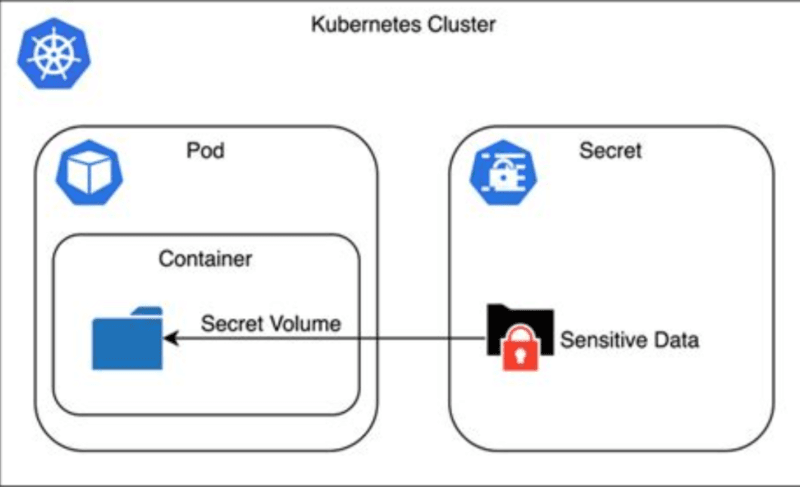
By default, Kubernetes Secrets are base64 encoded, so they are stored as plain text in etcd if you don’t set them up for encryption at rest. This is known, documented, and yet not done by a large proportion of real world clusters.
Leakage of secrets (via unencrypted storage, environment variables, and over-scoped access) is recognized as a major risk in the NSA Kubernetes Hardening Guidance (linked above). I’ve seen configurations where API keys were passed as environment variables for pods becoming available for the application to log and then show in plain text on a log stream.
The basic approach to secrets management has been refined and enhanced:
- Encryption at rest is intended for rolling out with EncryptionConfiguration API.
- Never store the secrets in Kubernetes Secrets, instead store them in external secrets managers such as AWS Secrets Manager, HashiCorp Vault, or GCP Secret Manager and access it at runtime for pods.
- Mount secrets as volumes, not environment variables — it is more difficult to log accidentally
- Only allow certain works up access to certain secrets in scope.
In more matured environments, the external secrets approach is becoming more popular for clear rotation of secrets, and there is a justification: it decouples the lifecycle of secrets from that of Kubernetes itself.
Read: Kubernetes Secrets Management: What Nobody Tells You About External KMS, Vaults, and Encryption
What’s Just Beginning: The Shift From Static Hardening to Runtime-Aware Protection
Why checklists alone won’t be enough going forward
The controls that we’ve covered so far, though real and significant are inherently static – once your app has been deployed – what you have there is what you have been dealt. The trajectory of Kubernetes security is trends toward continuous protection, knowing what is happening at runtime.
The new user namespaces feature has become stable in some of the latest versions of Kubernetes. They bind container UIDs with unprivileged host UIDs thereby greatly lowering the blast radius of a container breakout. When a process pscreens the container, its executed under non-root privileges on the host. It’s a valuable improvement to isolation that is achieved without any changes to applications.
A new feature for native sidecar containers (graduated to stable in 1.29) has implications for deployment of security and observability tooling. Sidecars which must be started before the app containers, and stopped after them (such as mTLS proxies, or log shippers) now behave automatically and reliably throughout the lifespan of the pod. This is a true enhancement for any service mesh security pattern.
Controls in the supply chain becoming “interesting experiments” to “expected baseline practice,” including SBOMs; image signing with Sigstore/Cosign; admission-time verification. It’s mature enough that there really shouldn’t be any point in not signing and verifying images in production.
New runtime detection tools – such as Falco and Kubescape 4.0 – which have become more deeply embedded within policy – and event – frameworks make threat detection at scale more feasible. Moving forward, 2026 isn’t necessarily a point-in-time direction, it’s a continuous behavioral monitoring approach.
What Most People Get Wrong About Kubernetes Security Failures
It’s almost never a zero-day – it’s almost always misconfiguration
This is something which most security talks tend to overlook and never fail to be the biggest source of failure when it comes to Kubernetes security; It is about mis configuration and not Kubernetes itself.
Overly permissive RBAC. Pods running with host networking enabled. Preserving secrets in unencrypted storage or via environment settings.Keeping secrets in unencrypted storage or in env vars. No network segmentation. Production images from public registry that cannot be scanned. Away with suspicious API call audit logging and alerting!
There is no CVE for these. All of these are decisions (or non-decisions) that occur during the set up and occur again over time when teams tack on workloads without reinforcing the base line.
The real world takeaway: Do the simple thing first—then work up to more elaborate supply-chain tooling/processes/and runtime detection. This is a much more secure cluster than a cluster that has a fancy security platform and no one of all those basics.
Free Resources That Are Actually Worth Your Time
Where to learn without paying for courses you don’t need
The space has a lot of paid material that’s less effective and/or slower than free options. The following is what really matters:
Two external trust boosters which you can link to your content:
| Resource | What It’s Good For |
|---|---|
| Kubernetes Security Docs | Official baseline — start here |
| NSA Kubernetes Hardening Guidance | Practical checklist from real threat modelers |
| CIS Kubernetes Benchmarks | Compliance-oriented and testable with kube-bench |
| OWASP Kubernetes Resources | Risk framing and top-ten style threat categories |
| Awesome Kubernetes Security (GitHub) | Curated tools, labs, and links — kept current |
| CNCF Free Ebook on Security Patterns | Cloud-native security patterns with practical context |
- NSA Kubernetes Hardening Guide (PDF)- anchor text: “NSA Kubernetes Hardening Guidance”- a government-published security document that has credibility as a citation
- CIS Kubernetes Benchmarks is an umbrella made reference to in compliance discussions, and it’s open source tooling that’s straightforward to test.
The best way to have hands-on experience is to start a local cluster (you can use kind or k3d here if you want) run kube-bench against it, and go through the results one by one. There is a lot more that is taught in that one exercise than in most of the paid ones.
How to Actually Build Skills and Leverage This Professionally
My take on what separates people who talk about Kubernetes security from people who practice it
There are plenty of folks who know the RBAC docs! The rare and more valuable combination are those who can view a cluster, see the holes that are not insignificant, and fill them with impressive ease without disrupting production.
The trail in progress:
- Familiarize yourself with the baseline from official docs and NSA/CIS guidance – it is best to do this first rather than skipping.
- Simply end-to-end harden a test cluster: RBAC, PSA, NetworkPolicy, secret encryption and audit logging.
- Execute scan tools – kube-bench, trivy for images, falco for runtime detection scan, kubeaudit for configuration review scan
- A blog post, internal wiki page, or GitHub repo listing your hardening process is more convincing to most engineering teams than any certification, and it documents a change that’s easy to reproduce.Most engineering teams will find it more compelling to see your hardening process documented in a blog post, wiki, or a GitHub repository than to see any certification, and it documents a change that’s easily replicable.
- Keep abreast – the pace of Kubernetes security changes are significant significant from release to release, so the Kubernetes security blog and the Kubernetes changelog are the best indicators.
This directly correlates to DevSecOps, platform engineering, and cloud security positions. Organizations are looking for resistant bodies that can minimize risk without introducing resistance to deployment. It is what tradespeople actually do for a living.
FAQ: Quick Answers to What People Actually Search For
What is Kubernetes hardening?
It is a process of limiting the attack surface of the cluster through: restricting access, clustering workloads together, implementing security policies and implementing monitoring instead of relying on permissive defaults.
What replaced PodSecurityPolicy?
Pod Security Admission (PSA) was replaced by the Pod Security Standards. Easier to set up and run at the namespace level with labels.
Where should you start if the cluster is already in production?
To obtain an initial understanding of what is misconfigured, run kube-bench first. Next, audit, enforce RBAC policies, pod security standards and then secret encryption.
Does Kubernetes security only cover the cluster?
No. It does the same thing for all your cloud infrastructure, cluster configuration, container and image security, runtime detection, supply-chain controls, and application-level code.
Is runtime detection necessary if the cluster is hardened?
Hardening leads to a decrease in your attack surface, but it does not mean that the threat is gone. Even though someone configuration can’t anticipate them, runtime detection is able to detect behavioral anomalies, such as a container generating an unexpected shell or performing some abnormal network calls.
Can someone learn this deeply for free?
Yes. These are official, authoritative, free and available resources that provide information about Kubernetes: NSA guidance, CIS benchmarks, OWASP Kubernetes resources and curated GitHub lists. All the tooling (kube-bench, Trivy, Falco, kubeaudit) are open source.
Honest Summary
Securing is not an end deliverable for Kubernetes. This is a position – and posture must not be developed with only a set of checklist items.
The most important controls are the ones that are already in place: RBAC (correctly implemented), Pod Security Admission at Restricted (if it is available), NetworkPolicy (default-deny), secrets not associated with environment variables, image scanning and image signing prior to image run.
The baseline will be further strengthened by what follows – user namespaces, points to the supply chain at entrance time, then by runtime behavior detection. None of these is a substitute for the basics first time!
It’s one of the better spaces to gain mastery in these days and years for a 20-something just starting to enter the world of cloud security or DevSecOps. There is a real need, tooling is open source and most of the organizations are still on the basics of it – so there is the possibility of adding immediate visible values to it.
Get an early test cluster. Run kube-bench. Fix the findings. Write it up. This is the real route.

I’m a technology writer passionate about AI and digital marketing. I create engaging and useful content that bridges the gap between complex technology concepts and digital technologies. My writing makes the process easy and engaging. I encourage participation I continue to research innovation and technology. Let’s connect and talk technology!