Nintendo Switch 2 isn’t a revolution in hybrid portables; it’s a genuine evolution of the platform. A larger, higher-res display, genuine performance improvements, an improved Joy-Con system, and an expanding library of in-depth, upgraded titles mean mean most owners of the original Switch will see it as an upgrade. Not affordable, a long-lasting battery life, or a must-have if you’re already happy with your Switch OLED and want to play the games. This review covers what has truly evolved, where it still falters, and who should buy now or hold out.
Table of Contents
Nintendo Switch 2 Review at a Glance
| Design | 9/10 |
| Display | 8/10 |
| Performance | 9/10 |
| Graphics | 8/10 |
| Battery Life | 6/10 |
| Joy-Con 2 | 8/10 |
| Games & Library | 9/10 |
| Value | 7/10 |
| Overall | 8/10 |
Verdict: An authentic step forward in nearly every aspect, though limited by its price and battery!
Who it is ideal for: people who want to keep playing on their original Switch or Switch Lite with newer features.
Biggest disadvantage: in heavy games, battery life is around 2 hours.
Design and Build Quality
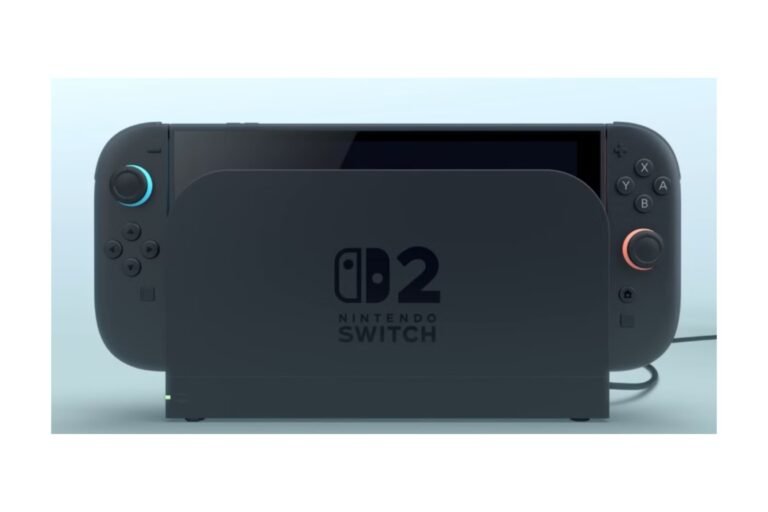
The Switch 2 adopts a familiar tablet-plus-controllers form factor, but everything is bigger. The actual hardware is larger to fit the bigger screen, and the new kickstand provides more stability than the flimsy flap its predecessor relied on, an all-too-austere enhancement for tabletop gaming. Nintendo added an extra USB-C port and redesigned the dock, which matters more than it might sound for practical cable management when the system is docked.
Build quality is a slight improvement over the original Switch, but this is still plastic. Slight downgrade to portability due to being slightly larger and heavier, though only a marginal ding. If you put much emphasis on the Switch Lite’s pocketability, you’ll notice.
Display Quality
The headline upgrade is the larger, sharper new screen. The 7.9-inch 1080p HDR LCD in the “upgraded” Switch is a big jump from the ol’ 6.2-inch 720p LCD in the original model. Double the refresh rate to 120Hz, and it makes the menus, UI, and speedy games play far more smoothly on the go. As for everything that displays text or lots of extra detail strategy games, RPGs, anything that’s interface-heavy the screen is worth it on its own.
The trade-off is that Nintendo stuck with LCD screens instead of opting for OLED. If you have an original Switch, you will be happy with this upgrade, as it will look much better. However, if you have a Switch OLED (or newer), you might prefer the current blacks and contrast, despite the larger, more detailed display.
Has Nintendo Switch 2 Improved Since Launch?
This is one of the things that distinguishes a current review from a launch-day one: Nintendo incorporated VRR support for TV mode in firmware version 23.0.0. This is a significant feature upgrade for modern TV gamers, as it seeks to quell the negative effects of pixel pacing by eliminating frame-rate inconsistencies that lead to stutters. So, when you’re weighing up the purchase against an older Switch 2 review, this is an area where software has truly enhanced the hardware.
Performance and Graphics
The Switch 2 is a significant step up here. The added CPU and GPU power means snappier load times, steadier frame rates, and, overall, better handheld graphics options. Docked output can now reach up to 4K in supported scenarios, with many titles now implementing upscaling techniques similar to DLSS.

Resolution and Frame Rates
Games that you would never have considered were even possible on the first Switch, including Cyberpunk 2077, Final Fantasy VII Rebirth, Resident Evil Village, Hogwarts Legacy, and Assassin’s Creed Shadows, all run at a playable performance. Even the latest release, Elden Ring: Shadow of the Erdtree, proved the hardware can handle AAA titles without sacrificing too much resolution or effects compared to a PS5 or an expensive PC.
DLSS and Upscaling
Games that use selective upscaling can reach higher target resolutions without the horsepower to render natively at those rates. It’s an effective use of limited computational resources, but some titles benefit more than others: some are quite crisp, while others show more softness and artifacts.
Handheld vs. Docked Graphics
Unsurprisingly, higher resolution in docked mode (and even better, though less noticeable, frame-rate stability in a few games) remains the norm, since there are no battery/thermo constraints that impact performance in docked mode. The system’s identity is handheld, however, and most games are designed with that in mind. Make no mistake: the Switch 2 is still significantly underpowered compared to a PS5, Xbox Series X, or gaming PC in terms of raw hardware. Its key strength isn’t trying to out-spec those consoles, but doing so while staying portable.
Audio Quality
Audio isn’t a headline star feature, but it’s worth knowing about before you buy. The built-in speakers and generic headphone jack perform as expected, and docked audio output works well for TV use. The one negative: early reviews have raised concerns about Bluetooth audio lag, which matters if you use wireless earbuds or over-ear headphones and find delays from command to sound off-putting in FPS or racing games.
Handheld Gaming Experience
Handheld remains the Switch 2’s primary mode, and the bigger screen, enhanced performance, and redesigned Joy-Con 2 controllers combine to make it more comfortable for longer sessions than its predecessor. The larger footprint will cause a little more wrist fatigue after lengthy handheld use, but for most users, that’s an acceptable trade-off. If hand fatigue matters to you, try this in person.
Is Switch 2 Comfortable for Long Gaming Sessions?
For the majority of adult hands, yes, the bigger grips on Joy-Con 2 are an upgrade from the narrower shapes of the original. If you liked the smaller PlayStation Portable-sized Switch Lite, the Switch 2 is going to seem like a lot more work to hold.
TV Gaming Experience
When docked to a TV, the Switch 2 offers up to 4K output for supported games, HDR, and the recently unlocked VRR support to smooth frame pacing on compatible displays. This is a significant upgrade from the original Switch, and it’s one of the clearest justifications for the console if you split its use between handheld and living-room sessions.
Joy-Con 2 Experience
The new Joy-Con 2 controllers are bigger, and the change from the original’s sliding rail system to a magnetic attachment is one of the most useful, if underwhelming, changes to the whole machine. Controllers snap on and off quickly, and the connection feels more solid.
Mouse Mode
Joy-Con 2 also has controls similar to a computer mouse, which work when you move the controller across a flat surface in certain games. Quite a unique feature – it can be a big help in certain types of games (particularly strategy and shooter games, or any game with lots of menus to navigate), but it has received a varied response from users. It works in the right circumstances and environment, but it’s no replacement for a mouse and doesn’t work with every game.
Comfort and Controls
Other than the party trick mouse mode, the fundamental controls analog sticks, motion controls, HD rumble feel like meaningful, if small, upgrades. The original Joy-Con controllers are compatible with some, though not all, Switch 2 functions.
Battery Life
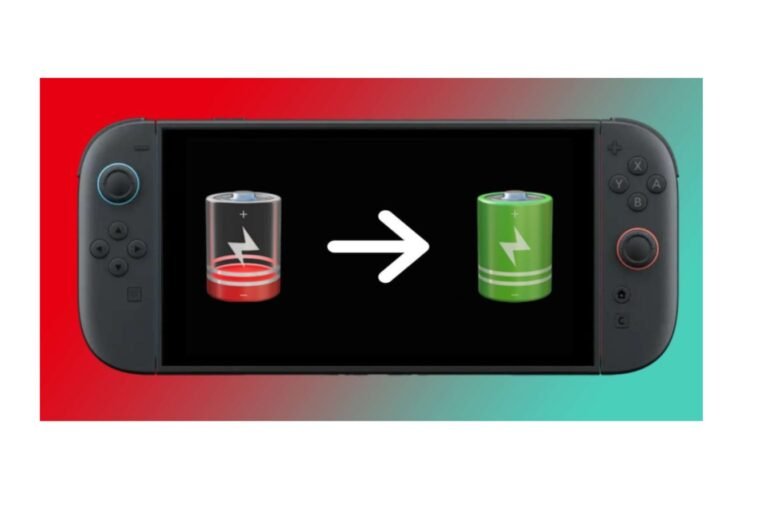
This is the Switch 2’s most obvious flaw, and one Nintendo often obscures with its own descriptions. While Nintendo claims battery life of somewhere around 2 to 6.5 hours, this range doesn’t quite tell the whole story; the battery drain when playing demanding, graphics-heavy games can drop way below the easier strain of a title like Mario Kart World, which really only runs to about four hours when measured in the real world as meshed out by WIRED and fellow outlets. This drops off to about two hours of lighter gameplay. When docked, this isn’t a factor, but if you’re hoping to spend a fair amount of time on the go without constantly searching for power sockets, this is the number to keep in mind, not the false upper bound advertised by Nintendo.
Storage and microSD Express
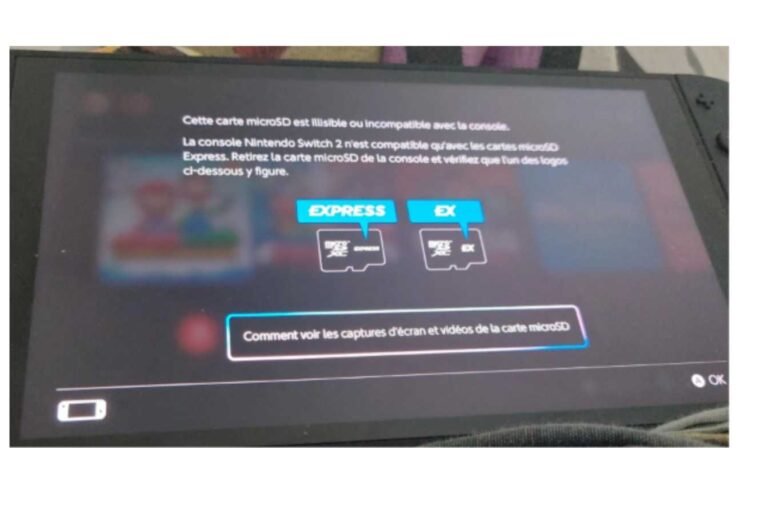
The Switch 2 surprisingly ships with 256GB of built-in storage, noticeably more than the original console’s pathetic base storage. The problem is that expansion has once again moved into newer and more expensive territory: microSD Express cards are now needed instead of traditional microSD cards (older generations of Switch can’t use these new cards for expanded storage). Given that Switch 2 games appear to be even bigger than usual, especially remasters and big AAA ports, you should plan for more storage sooner rather than later.
Nintendo Switch 2 Games and Game Library
The 2026 game library is markedly different from what launched with the console. It ranges from Nintendo-only games and Switch 2 Editions of older titles with boosted visuals and performance, to an expanding flood of third-party AAA ports that would have been impossible to run on the original console: Metroid Prime 4: Beyond, Mario Kart World, Hogwarts Legacy, Red Dead Redemption, No Man’s Sky, Split Fiction, Resident Evil Village, Star Wars Outlaws, among others.
Publishers releasing revised editions of existing games (a so-called Switch 2 Edition) is becoming an important part of the console’s character. The most notable Nintendo title is the Mario Kart 8 Deluxe update, which now offers eight-player local split-screen, improved graphics, and quicker loading times on the Switch 2. A clever way to make existing ownership more worthwhile, provided you don’t pay for the newer edition.
Nintendo Switch 2 Backward Compatibility
Most physical and digital original Switch titles will play on the Switch 2, so this remains one of the best reasons to buy in, since you’re not starting over. However, compatibility is not 100% inclusive. Titles that depend on distinctive features of the original Joy-Con controllers (such as the infrared sensor) may be constrained, so do check that particular title’s compatibility first.
GameChat and GameShare
GameChat is Nintendo’s proprietary messaging app, which allows voice chat and “game sharing” with up to 12 players, plus video calling (via a compatible USB camera) for up to 4 players. Quite a dramatic improvement over the original Switch’s clumsy implementation of voice chat.
However, there are subtle barriers: this requires a Nintendo Switch Online subscription, a separately sold camera to use the video chat features, phone-number registration in certain regions/for certain accounts, and usage may be gated behind parental approval if younger children are involved. Connection stability also determines how natural the flow of communication feels. For families or groups of friends that game quite often together over Discord or in-console party chat, GameChat is more of a bonus than a requirement, but for a local Nintendo-focused multiplayer clan, it’s a great addition.
GameShare, the second idea where others can come and play some of your games without having to own the game, is a potentially good idea, but in practice, many limits- both games and connections – will determine how well it works.
Nintendo Switch 2 vs Original Switch
| Display | 7.9″ 1080p HDR LCD, up to 120Hz | 6.2″ 720p LCD |
| Performance | Significantly stronger CPU/GPU | Dated, limits modern ports |
| Storage | 256GB, microSD Express | 32GB, standard microSD |
| Controllers | Joy-Con 2, magnetic, mouse mode | Original Joy-Con, rail-based |
| Docked output | Up to 4K in supported games | Up to 1080p |
| Battery life | ~2–6.5 hours | ~4.5–9 hours |
| Backward compatibility | Plays most original Switch games | N/A |
The net: virtually every spec advanced, save battery life, which declined slightly on paper due to the beefier hardware.
Nintendo Switch 2 vs Switch OLED
| Display type | LCD (larger, sharper) | OLED (richer contrast, deeper blacks) |
| Performance | Much stronger | Same as original Switch |
| Resolution | Up to 4K docked | Up to 1080p docked |
| Battery | Shorter, more variable | Longer, more consistent |
| Games | Modern AAA ports, exclusives | Original Switch library only |
| Price | Higher | Lower |
But the question is whether Switch OLED owners should upgrade. It’s not quite as crystal clear as it was for the original Switch. What you’re giving up for a better-looking screen and improved autonomy is actual performance improvements, new Nintendo alums, and third-party offerings… It’s a fair case to stay put if you’re happy with it so far.
Nintendo Switch 2 vs Steam Deck
The key here isn’t raw power (and the Steam Deck and others can beat the Switch 2 in certain respects), but access to a far larger collection of PC games. The Switch 2 instead offers Nintendo’s titles, a generally simpler day-to-day experience, and a more refined, unified experience without the headaches of a PC-like operating system. If you’re looking for a dedicated Nintendo device and don’t already have a PC Gaming device, the Switch 2 is the easier option. If having a vastly superior selection of PC games and sheer performance is more important to you than having Nintendo exclusives, the Steam Deck ecosystem is worth a look.
Hidden Costs of Owning a Nintendo Switch 2
The console price is only the starting point. Budget for:
- Games. Like Switch 2 Editions that could cost a few bucks more, even for games you already have.
- A microSD Express card, because it is incompatible with older microSD cards, to expand storage if necessary.
- 1] Nintendo Switch Online, essential to GameChat and many other features of the Switch.
- A USB-C camera, which you’ll need to buy separately for GameChat’s video capabilities.
- An additional set of Joy-Con 2 or a Pro Controller for local multiplayer
- A not-included carrying case and screen protector for those who travel with the console often
These aren’t weird for a modern machine, but they add up and can be easily undervalued when you look at sticker prices.
Who Should Buy Nintendo Switch 2?
Buy it if you:
- Have a standard Switch or Switch Lite and want an upgrade to boost performance?
- Return Nintendo exclusives in the best portable format available.
- Often do local multiplayer with family or friends.
- Crave modern third-party AAA games on a portable system.
- Already have a Switch library you’d like to carry on with, but want it to run more efficiently.
Consider waiting if you:
- Already have a Switch OLED and are happy with your current library.
- Mostly use the power at home, where it’s close by.
- Have many smaller cells that need long battery life to be useful for travel.
- Are chasing the most ideal graphics—the graphics we should be designing for are for optimal viewing.
- If you already have a capable gaming PC or a modern console that plays third-party titles, there is little reason to buy a new system.
Final Verdict
The Nintendo Switch 2 also delivers on the most important things for a hybrid: a larger, denser display, actual performance improvements, improved Joy-Cons, and a rapidly growing library that finally makes Sony-like AAA third-party titles possible on Nintendo hardware. The cost, Battery life on demanding games, and LCD (non-OLED) screen are honest trade-offs, not reasons to shy away but worth coming in knowing. For most original Switch and Switch Lite owners, this is a simple, worthy upgrade; for Switch OLED owners, it’s a more nuanced trade-off that comes down to how much you care about new games and performance versus the current display and battery.
See our Nintendo Switch 2: Complete Guide for the full breakdown of specs, pricing, and setup.
FAQs
Is Nintendo Switch 2 a really worthwhile purchase?
Yes, for most new buyers and original Switch owners who want to play Nintendo exclusives, thanks to its portability and power. The argument is weaker for Switch OLED owners and people who want high-end graphics and battery life.
What is the life of the Switch 2 battery?
Official information says the battery lasts about 2–6.5 hours. More demanding games can reduce this to a couple of hours, while lighter games (e.g., Mario Kart World) are estimated at four hours of runtime.
Is it possible for Switch 2 to play Switch games?
Most physical and digital Switch titles are compatible; products with restrictions use specific original Joy-Con functions.
Is Switch 2 Edition upgrade free?
Not necessarily. Some games are free to upgrade, and some have separate editions. The listing will tell you for each game.
Does GameChat also need Nintendo Switch Online?
Yes, you need Nintendo Switch Online, Internet access, and a USB webcam connected to the console to enable video chat.
Is there any improvement in Switch 2 as compared to Switch OLED?
But more comfortable in terms of performance, resolution, loading speed, and access to the new games. The OLED version of the Switch might also suit users who prefer vivid contrast and deep blacks and are willing to pay less.

I’m a content writer passionate about games and strategy. I’m dedicated to creating engaging, informative content for today’s audience. I keep a close eye on the latest gaming and industry trends to deliver entertaining, informative articles. Whether it’s exploring new tools or analyzing the sport, I bring a new, accessible voice to each episode. Let us connect and enhance your content with knowledge and insight!