
Last updated on October 16th, 2026 at 10:22 am
Nintendo Switch 2 is the successor to Nintendo Switch, which launched as a portable and TV-docked hybrid console in June 2025. Nintendo Switch 2 stays true to the features that made its predecessor so popular, but has a host of refinements to keep it relevant for years to come: a larger, crisper display, true 4K docked, more internal storage, new Joy-Con 2 controllers, and fresh social features like a new GameChat feature. This walkthrough story lays out what the console actually provides right now, where it doesn’t quite keep up, and whether it’s worth a buy whether you’re buying your first Switch or upgrading to the new version.
Table of Contents
Quick Facts: Nintendo Switch 2
| Release date | June 2025 |
| Price (US) | $449.99 at launch; $499.99 as of 2026 |
| Display | 7.9-inch LCD, 1920×1080, HDR10, up to 120Hz VRR |
| Docked output | Up to 4K at 60fps; high-frame-rate modes (1080p/120fps, 1440p/120fps) |
| Storage | 256GB internal (UFS) |
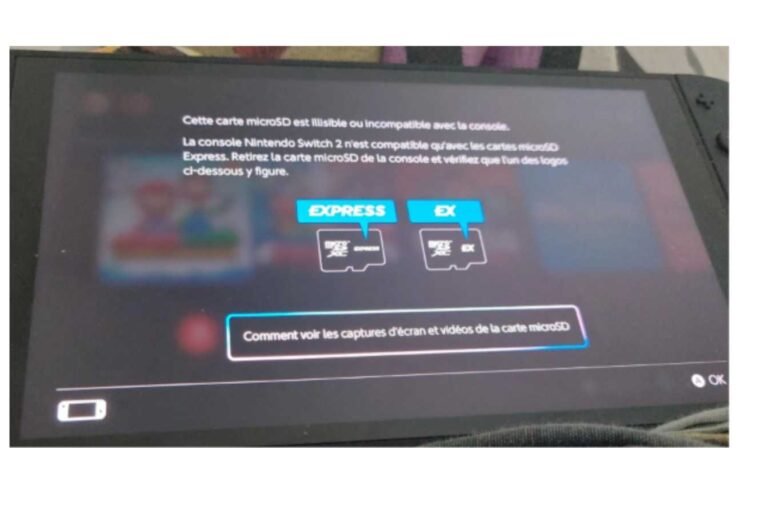
| Expandable storage | microSD Express only (standard microSD not supported) |
| Battery life | 2–6.5 hours (varies by game) |
| Controllers | Joy-Con 2, magnetic attachment, USB-C charging |
| Backward compatibility | Most original Switch games, plus enhanced/upgraded titles |
| TV mode | Full dock with USB-C charging; HDMI 2.1 features are limited |
What Is Nintendo Switch 2?

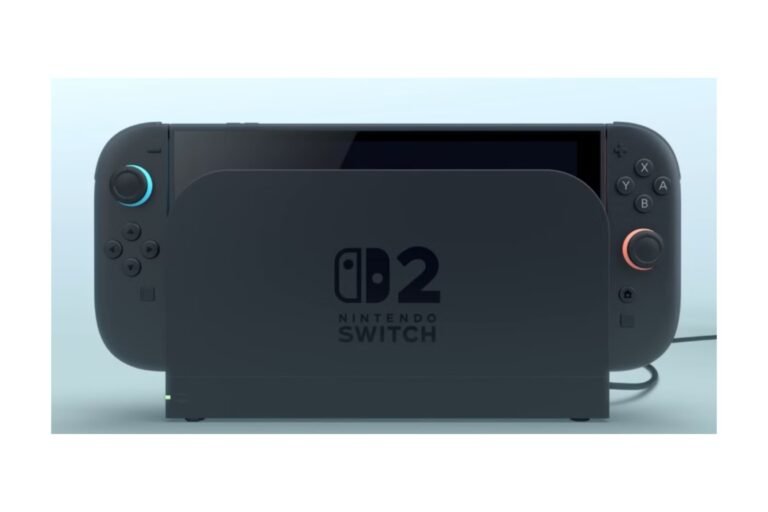
Nintendo Switch 2 keeps the same hybrid gaming platform as the original: you can dock it to play on a TV or remove the Joy-Con controllers to play on the go, but this time with significantly more powerful hardware. As you might expect, the biggest difference is the screen: a 7.9-inch LCD with over 1920×1080 resolution, compared to the original’s 6.2- to 7-inch, 720p screens. It also offers HDR10 support and variable refresh rates up to 120Hz, making fast motion feel even more fluid.
Docked, the improvements are even more significant. Switch 2 can push up to 4K at 60fps in qualifying titles, and it also offers high-frame-rate options at 1080p/120fps or 1440p/120fps to keep speedy, competitive games running smoothly and looking good. An enormous step up from the original, which could only achieve 1080p when docked, and frequently couldn’t lock a steady 30fps.
The console is targeted towards three tangential groups: current Switch users, who feel constrained by the versatility of the original platform; potential Switch buyers wanting a “next-gen” hybrid that won’t require a mass-producer console investment; and Nintendo-bolstered fans, anticipating launch-day availability of fresh first-party titles developed exclusively for the upgraded hardware. It’s no paradigm shift. It’s more the same idea, implemented on a platform that eventually matches today’s games.
Looking for the complete details? read our Nintendo Switch 2 Specs: The Complete Hardware Guide. If you can’t decide between generations, our Nintendo Switch vs Switch 2: What’s the Difference? and Nintendo Switch OLED vs Switch 2: Which Should You Buy? articles go into more detail with that choice.
Nintendo Switch 2 Release Date
Nintendo launched the Switch 2 in June 2025. As a significant upgrade to the previous console, Nintendo released the new console worldwide at once,s in a traditional console launch rather than rolling it out by regions, as has been more common for Nintendo hardware. On launch day, standard console bundles and game bundles pairing the system with first-party titles were sold.
Nintendo has increasingly focused on providing free software updates for the existing Switch game library rather than treating the console as a static, unchanging device from launch.
Nintendo Switch 2 Price
Nintendo Switch 2 launched in the US at $449.99. US price has since increased to $499.99 as of 2026, bringing the console noticeably closer to entry-level dedicated gaming PCs and handhelds such as the Steam Deck than its predecessor ever was. That increases the question of value when the new console is directly compared to the original Switch: what is this device offering me over the original for this increase in cost?
What is in the box: The console, 2 Joy-Con controllers, the dock, and the cables needed to connect to the dock. Nintendo and various retailers release bundles that include the console and a Nintendo-published game at a slight discount when bought together instead of separately. In addition to the console, you will need to purchase a microSD Express card (standard microSD cards aren’t supported – details below), a Nintendo Switch Online subscription for online connectivity and cloud saves, and anything else you want branded to your liking besides what is included with the console.
If that’s a good value depends on what you’re trading up from. From an original Switch or Switch Lite, the performance leap, screen quality, and storage bump is significant. From a Switch OLED, it’s less obvious, since you’re paying more for hardware improvements that are most noticeable in particular situations (see our OLED comparison section below).
You can find current pricing, bundles, and best deals in our Nintendo Switch 2 Price: How Much Does It Cost? guide and our Nintendo Switch 2 Black Friday Deals page during sales periods.
Nintendo Switch 2 Specs
Here’s a snapshot of the specs that matter most for day-to-day use:
| Display | 7.9-inch LCD, 1920×1080 |
| Refresh rate | Up to 120Hz (variable, game-dependent) |
| HDR | HDR10 supported |
| Docked output | Up to 4K/60fps; 1080p/120fps and 1440p/120fps modes available |
| Internal storage | 256GB (UFS) |
| Expandable storage | microSD Express cards only |
| Controllers | Joy-Con 2 (magnetic attachment, USB-C charging) |
| Kickstand | Adjustable up to 150 degrees |
| Charging | USB-C; second USB-C port for charging in tabletop mode |
The most obvious upgrade is the screen. The move to a full 1080p handheld display makes text visibly crisper and fine detail far more legible, especially in games with heavily populated UIs and/or tiny text. The HDR10 support provides actual contrast in supported titles. However, the panel is LCD instead of OLED, which you should understand before you buy, and which we discuss in more detail in the OLED comparison section below.
The other big improvement is storage. Up to 256GB right out of the box is a big improvement over previous Switch consoles that shipped with 32GB or 64GB of storage, where most users had to rush out and buy a microSD card within minutes to install a few recent titles. However, unlike in the past, the Switch 2 will only support microSD Express cards for storage expansion, so any regular microSD cards you already have from your original Switch won’t cut it. Find out how that affects your purse in the storage section down below.
Click through here for the complete, detailed specs of each bit of hardware: processor, GPU, RAM, ports, and wireless.
Nintendo Switch 2 Features

Beyond the hardware specs, several factors determine what it is actually like to use a Switch 2 day-to-day.
The Joy-Con 2 is a more radical revision of the controller design. They no longer slide onto rails as their predecessors do, but attach magnetically, which is both faster and more forgiving of a touch-and-go tip. The sticks and buttons are larger, and rumble has been enhanced and integrated with a USB-C connection rather than being reserved for rail contact alone. As a novel input technology, some games support a mouse-control mode that detects the Joy-Con 2’s sensors against a flat surface: “a truly novel input mechanism rather than an improvement on an existing one”.
A single C Button on the Joy-Con 2 brings up GameChat (Nintendo’s native voice chat system), so players aren’t navigating Wii menu screens in the middle of a game. Meanwhile, with GameShare (which helps share game clips and, in some cases, lets a friend join a game session without owning a copy), the Switch 2 seems to lean even more toward social and multiplayer gaming than the console was originally designed for.
The dock and tabletop mode also got some practical improvements. The kickstand is now adjustable to 150 degrees, enabling tabletop mode to be played at less upright angles on more surfaces. A second USB-C port on the top of the console also lets you charge in tabletop mode without the dock.
Nintendo Switch Online has more streamlined integration, so GameChat and other improved multiplayer capabilities are directly integrated with an active subscription. Several of these improved titles now support 5–8 local players on a single Switch 2, which is a big leap for local multiplayer and party games.
Nintendo Switch 2 Games
The games library for Switch 2 consists of 3 categories: games developed exclusively for Switch 2, still only available on Switch 2 and neither backward compatible nor available on the older Switch; “Switch 2 Edition” remasters of existing games with upgraded graphics and new features and upgrades; and the existing line-up of original Switch games, which are all playable on the more powerful Switch 2 with some offering free performance improvements.
New exclusives and enhanced versions are where the new hardware is most prominently demonstrated. Expect 4K docked modes, higher frame rates, and new Switch features. Existing Switch titles also receive significant free update patches that generally improve resolution, frame rate, load times, and HDR support for swathes of already-purchased games. Some titles are available (typically at a premium price) as ‘Upgrade Packs’ or a dedicated ‘Switch 2 Edition,’ offering not just performance improvements but entirely new content and features.
Third-party support has been something of a rollercoaster. While a few multiplats have already seen Switch 2-specific performance updates to help them catch up with their PS5, Xbox, and PC equivalents, others have fallen a little flat; the differences have still been stark, and haven’t always diminished in the weeks following release.
If you’re seeking suggestions for games, refer to our Best Nintendo Switch 2 Games list. For GameCube compatibility in particular, see our Nintendo Switch 2 GameCube Games: Full list. We have guides for particular popular games, such as Minecraft on Nintendo Switch 2: Everything You Need to Know and Best Racing Games for Nintendo Switch 2.
Nintendo Switch 2 Accessories
A few extras are worth knowing about before or just after buying the Switch 2. Cases and screen guards are the most straightforward, and also the most needed, as the larger 7.9inch screen is a different size from what original Switch accessories have been designed for; most original Switch cases and screen guards won’t fit. A second pair of Joy-Con 2 controllers is convenient for multiplayer gaming at home. Still, they play nice with the system’s magnetic attach system, so check compatibility thoroughly if you’re considering other manufacturers.
When it comes to spending the most for accessories, it is storage. Since Switch 2 will need microSD Express cards, not regular microSD cards, this isn’t a purchase you can cover with your existing collection; it’s a dedicated, and currently costlier, accessory category. We detail pricing and suggestions in our storage section below, as well as in our dedicated guide.
Additional accessories that might be good to pick up are a spare dock if you tend to pass your console between different rooms to use, a camera that will work with the video Chat benefits, and more than one USB-C charger so you don’t have to fight for the same one when they are both in use.
If you want a complete buying recommendation, have a look at Best Nintendo Switch 2 Accessories, Nintendo Switch 2 Case: Best Cases and Covers, Nintendo Switch 2 Dock: Complete Guide & Nintendo Switch 2 Controllers and Joy-Con 2 Guide.
Nintendo Switch 2 Battery Life
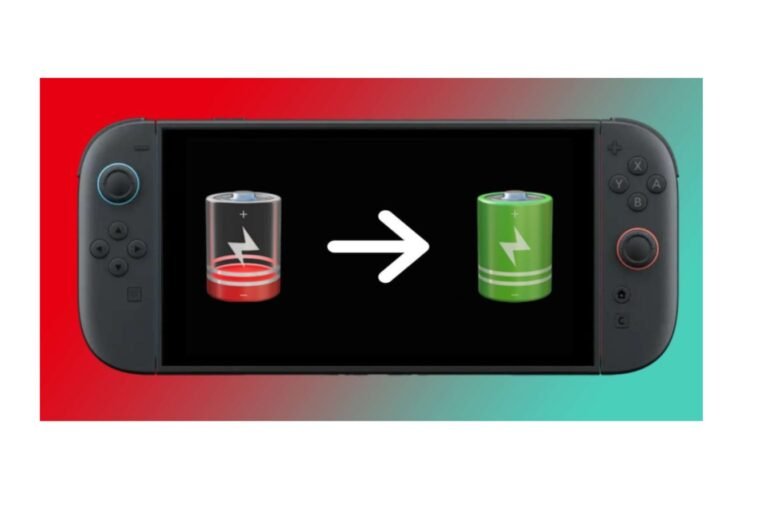
The battery life is one of the more disappointing aspects of the Switch 2 story. Official numbers state between 2 and 6.5 hours of battery life, though this will vary greatly depending on the application;e more demanding, graphically intensive games will have a lower number, while simpler titles will last significantly longer. This is a significant step back from the Switch OLED in similar scenarios, and it’s a key point to consider if you primarily use the Switch on the go.
This is the fundamental trade-off Nintendo made: a bigger, higher-res, higher-refresh-rate screen and more powerful internals consume more power, and battery capacity didn’t increase enough to match it. Docked play eliminates this problem since the console stays charged through the dock, but if you do most of your sessions on the go in hand-held form factor, you should expect to charge more frequently than you would with the Switch OLED or the original Switch.
A handful of practical measures can help: dim the screen, limit the refresh rate (which most games allow), and, if neither is possible, exit any downloads running in the background to extend playtime. Here’s our complete article on real-world battery testing, charging times, and battery-saving configurations: Nintendo Switch 2 battery life: how long it lasts?
Nintendo Switch 2 Storage
The Switch 2 also ships with 256GB of internal UFS storage, a significant bump up from the 32GB or 64GB that shipped in most original Switch variants. In reality, this is enough space to easily load up a handful of current launches without ever even having to add an expansion card, something those original Switch owners didn’t get to quite experience out of the box.
The but is expansion. Switch 2 can only use microSD Express cards for game storage; any other microSD cards (including many of the ones you already own from a previous Switch or Switch Lite) will be incompatible. microSD Express cards are a newer, higher-performance standard, which means there’s currently a real cost premium of around $40-$65 over what you already planned to spend if you need meaningful storage expansion (more than 64 GB).
As ever, the requirement for expansion will depend on player behavior. If buyers tend toward digital-only play, install multiple large titles at once, or otherwise build a large backlog of titles in storage, they can reach the 256GB ceiling sooner than a lighter user. Buyers who play primarily physical, or who are prepared to uninstall and redownload titles ‘on demand,’ may be able to make do with onboard storage for a time, meanwhile.
For a detailed explanation on pricing, best cards, and how much storage various play styles require, read our Nintendo Switch 2 Storage and SD Card Guide.
Nintendo Switch 2 Backward Compatibility
If you have an original Switch, the top question is likely whether Switch 2 is backward compatible with existing Nintendo Switch games; the good news is that it is.
While most titles do little more than run, many receive free upgrade patches that can improve resolution, frame rate, load times, and HDR support, giving older titles a worthwhile upgrade at no cost to the consumer. A smaller number of titles have paid Upgrade Packs or have received a specific “Switch 2 Edition” release, usually adding additional content and/or features and/or a more meaningful graphical update compared to a free patch.
Save data do tend to migrate across when transferring from an original Switch, and Nintendo has validated this process with subsequent software upgrades. However, coverage isn’t perfect; not every Switch game has had a Switch 2 optimization yet, and a small handful of better-known titles have shown lingering bugs weeks/months after the console’s launch, so make sure the title you’re interested in is supported.
Check out our Nintendo Switch 2 Backward Compatibility: Do Switch Games Work? guide for the entire list of what is confirmed compatible, improved, and requires an Upgrade Pack.
How to Set Up Nintendo Switch 2
Setting up a new Switch 2 is straightforward, but a few steps are easy to miss:
- Charge the console to 100% before first use by charging it in the dock or with a USB-C charger.
- Connect to Wi-Fi (set up year).
- Sign in or sign up for a Nintendo Account. This is required to use the eShop, cloud saves, and online multiplayer.
- Update system software without delay—Switch 2 frequently updates with added performance and features, and you’ll want the latest release before playing games.
- Pair your Joy-Con 2 controllers: they will either connect once attached to avoid pairing, or can be paired directly from the settings menu:
- If you are upgrading, transfer data from an original Switch using Nintendo’s built-in transfer tool, which transfers save data, screenshots, and, in most cases, the license information for your game library.
- Download/reinstall your games, especially those that have a Switch 2 upgrade patch available.
- Set up parental controls, if applicable, via the Nintendo Switch Parental Controls app or on the console.
- Start TV mode by plugging the dock into the TV via HDMI, and make sure the display options match your television.
The process itself takes less than an hour, but transferring a sizable game collection from an original Switch can take longer if your internet connection is slow and you need to redownload parts of the collection instead of just transferring them.
Nintendo Switch 2 vs Original Switch
| Display | 6.2–7.0-inch, 720p | 7.9-inch, 1080p, HDR10 |
| Docked output | Up to 1080p | Up to 4K/60fps |
| Storage | 32GB or 64GB | 256GB |
| Controllers | Joy-Con (rail-mounted) | Joy-Con 2 (magnetic) |
| Games | Full original library | Backward compatible, plus native/enhanced titles |
| Price (US) | $299.99 (original) | $499.99 (2026) |
The leap from the original Switch to the Switch 2 is huge in almost every area: the display, performance, storage, and controllers all improve significantly on the newer machine. The downsides are price and battery, which swing the wrong way for original Switch owners used to a cheaper, long-lasting handheld.
Our detailed guide covers the full comparison, including which games get a boost and whether buying now or later is worth it. Nintendo Switch vs Switch 2: What’s the difference?
Nintendo Switch OLED vs Switch 2
This is the harder comparison for many buyers, since the Switch OLED is arguably a great console on its own and costs less. The choice mainly boils down to a handful of compromises:
- Display: The OLED panel on the Switch OLED looks darker and has more contrast than the LCD on the Switch 2, despite the latter having a larger, higher-resolution display.
- Performance (Switch 2 wins): Shows docked output as significantly better (more meaningfully) and supports improved/native titles that don’t actually run on the base hardware at all.
- Storage: While Switch 2 (256GB) will offer much more built-in storage than Switch OLED (64GB), Switch OLED accepts cheap standard microSD cards rather than expensive microSD Express cards like Switch 2.
- Battery: Another win for the Switch OLED. Battery life is noticeably better than the Switch 2 in the same usage scenarios.
- Games: Switch 2 will be backward compatible and will support native, improved versions of the current Switch games; Switch OLED will run the current Switch library.
- Price: The Switch OLED is the less expensive device, and the price difference has only become wider since the release of Switch 2 and the price hike for it to $400 in 2026
So the Switch OLED is a good option if you prefer to play handheld gaming and want the best picture quality, or if you care more about battery life than having all the latest native games on the device itself. However, for better performance, higher resolution, and access to all new games, you should buy the Switch 2. Here is a complete side-by-side: Nintendo Switch OLED vs Switch 2: Which Should You Buy?
Nintendo Switch 2 vs Other Gaming Devices
The Switch 2 isn’t the only hybrid, portable gaming device available. Here’s how it compares:
Compared to the Steam Deck and other similar PC handhelds, Switch 2 sacrifices raw horsepower and open software freedom for a simpler, more refined experience and Nintendo’s first-party game library, which isn’t offered on any other platform. Compared to PS5 and Xbox, Switch 2 isn’t competing on docked graphical horsepower; it’s a portable-first device that can dock, not a home console that can be portable. For most consumers, the choice isn’t really Switch 2 compared to those other options; it’s whether a hybrid, Nintendo-focused product fits your actual play habits, which none of those other options can fully match.
Is Nintendo Switch 2 Worth It?
Who Should Buy Nintendo Switch 2?
The Switch 2 is the perfect pick for gamers who want immediate Nintendo exclusives, want docked performance and resolution, and who are okay with a higher price than the original Switch. It’s a good fit for new game collectors who want the highest-powered current hardware available, instead of buying into a previous generation.
Should Existing Switch Owners Upgrade?
If you already have an original Switch and play the games you enjoy reasonably well, there isn’t much urgency. But if you’re frequently annoyed by slow load times, blurry resolutions, or being excluded from newer games which don’t play well – or can’t at all – on original hardware, Switch 2 solves that, and it brings all your existing games along for the ride.
Should You Buy Switch OLED Instead?
Switch OLED could be worth it if battery life and contrast matter more than raw performance, or if the price gap is a concern and you don’t need day-one Switch 2 exclusives. It’s a solid console and not a compromise pick.
Reasons to Buy Nintendo Switch 2
- Considerably better display, resolution, and docked performance.
- 256GB Storage is included by default
- Availability of native, improved titles which the original Switch is unable to support
- Better controllers and social functions such as GameChat
Reasons to Wait
- Battery life is the most obvious trade-off for that lower price. I’ve found I get significantly shorter play times when the screen isn’t in dock mode and I’m using standard brightness settings. While it’s not a dealbreaker, it’s a noticeable downgrade from the already average Switch OLED and requires me to keep it docked more often than I’d like.
- The price increase in 2026 makes it harder for the average buyer to ‘jump in’.
- This added microSD Express cost is high if you need more storage.
- Some games haven’t yet been given Switch 2 upgrades, and a few third-party ports haven’t always been as strong on the new system.
You can get the full in-depth review in our Nintendo Switch 2 review: you buy?
Where to Buy Nintendo Switch 2
You can get a Nintendo Switch 2 from Nintendo’s official store and major electronics/general retailers. Direct purchase from Nintendo, or a mainstream retailer, is the most reliable way to ensure you have an original console that has not been altered or messed with and is eligible for a warranty, more than usual for Nintendo given the hardware-based approach they have had to modded or otherwise dodgy consoles. (Note below about online risks)
Consider what you’re buying; for example, whether you’re simply picking up the console or bundling it with a game, as prices and titles included are inconsistent and change over time. Consider whether you want physical or digital first, since storage space will eventually matter. Be cautious when purchasing from third parties or in-marketplace, as a price that is too low, lack of original packaging, or unwillingness by the seller to confirm what their console has been used for should be taken as a warning, especially when this comes with reports of accounts and hardware being locked out of online services.
Nintendo Switch 2 FAQs
What is Nintendo Switch 2?
Nintendo Switch 2 is the second-generation Nintendo Switch, for handheld and docked play on a TV, and it’s more powerful than the first generation; it was released in June 2025.
When was Nintendo Switch 2 released?
Nintendo announced the Switch 2 at E3 2025.
How much does Nintendo Switch 2 cost?
It launched at $449.99 in the US. As of 2026, the current US retail price is $499.99.
Is Nintendo Switch 2 worth buying?
If you want bigger, better, brighter screens and new and improved games, yes. If battery life and a lower price matter more, the Switch OLED may suit you better; see our full comparison above.
Is Nintendo Switch 2 backward compatible?
Yes, it currently plays almost every first-party Nintendo Switch game, many of which include free updates, performance upgrades, and some paid changes and exclusive Switch 2 Editions.
Can Nintendo Switch 2 play Switch games?
Yes, physical and digital original Switch titles work on Switch 2 (though some do not because publishers haven’t updated their games for compatibility).
How much storage does Nintendo Switch 2 have?
256GB standard. You can only expand internal storage with a microSD Express card.
How long does Nintendo Switch 2 battery last?
Official time estimates are from 2 to 6.5 hours, depending on game settings.
What games are available for Nintendo Switch 2?
Its lineup also includes authentic Switch 2-exclusive games, “Switch 2 Edition” enhanced ports, and most of the original Switch library, several of which come with complimentary performance improvements.
Does Nintendo Switch 2 come with a dock?
Yes, the console includes a dock for TV play and charging while docked.
Can Nintendo Switch 2 connect to a TV?
Yes, with the included dock and by using an HDMI connection to the TV.
Can you use old Switch controllers with Switch 2?
The physical attachment system for Joy-Con 2 controllers is different and magnetic, and the standard Joy-Con controllers aren’t a perfect match for the system, so we recommend checking compatibility before using older controllers.
Does Nintendo Switch 2 support microSD cards?
No, it specifically needs microSD Express cards. Standard microSD Cards (including any for your original Switch) are not supported for game storage.
What accessories do you need for Nintendo Switch 2?
Most buyers will need a case, a screen protector, and a microSD Express card (if the 256GB UFS 3.1 storage isn’t enough) (see our full accessories guide for suggestions).
Final Verdict
Switch 2 is a real, significant step up from the vanilla Switch: better display, better performance, more storage, improved controllers, supported by a growing catalog of native and remastered titles. It does come at a real cost, however: the battery has slipped backward; the LCD panel is marginally inferior visually to the Switch OLED; and the 2026 price hike, combined with the microSD Express mandate, increases ownership costs. For the average player, transitioning from an Early Release product or venturing into their very first hybrid device, Switch 2 is by far the best long-term value choice, even factoring in that cost of ownership. If you value handheld lifespan and contrast ratio more than raw performance, Nintendo’s current premium OLED product is still worth it only if you can live with the shortfalls.

I’m a content writer passionate about games and strategy. I’m dedicated to creating engaging, informative content for today’s audience. I keep a close eye on the latest gaming and industry trends to deliver entertaining, informative articles. Whether it’s exploring new tools or analyzing the sport, I bring a new, accessible voice to each episode. Let us connect and enhance your content with knowledge and insight!
[…] The case for the other two is obvious, and the Pro Controller is another comfort upgrade. Check what you already have first. You can still connect your regular Pro Controller and Joy-Cons wirelessly, and the Ring-Con still needs the original Joy-Cons. For the full console picture, read Nintendo Switch 2: Complete Guide. […]
[…] Nintendo Switch 2 Specs: Display: 7.9” 1080p (120 Hz max); Custom CPU; NVIDIA GPU; Resolution: Up to 4K supported by dock (60fps); Storage: 256GB internal. Nintendo generally releases most of its hardware specs. Still, it doesn’t specify RAM or GPU architecture, so we sourced those details separately from other news outlets and labeled them accordingly. This guide is for shoppers and upgraders who want the specs, not the noise. For the big picture, see our Nintendo Switch 2: Complete Guide. […]
[…] That’s the summary, but the details are more engaging. Pokémon FireRed and LeafGreen were released on Switch this year, and speculation about Hoenn is widespread. This guide distinguishes confirmed information from rumors, compares the three Hoenn games, and outlines the official ways to play them or similar titles. If you have a Switch 2, see our Nintendo Switch 2: Complete Guide. […]
[…] Read this section to understand how to interpret that range, what independent testing shows, the difference between charging and normal drain, and when it’s actually a problem. This is a part of our Nintendo Switch 2: Complete Guide. […]
[…] part of a broader debate about what console makers are willing to do with legacy libraries. Our Nintendo Switch 2: Complete Guide explains how manufacturer-supported emulation differs from […]
[…] That one rule causes most buying mistakes. This article explains Nintendo Switch 2 SD cards, including the built-in storage limit, what goes on a card and what doesn’t, and capacity recommendations. Upgrades and troubleshooting. As part of our Nintendo Switch 2: Complete Guide. […]
[…] Take compatibility on a title-by-title basis. Validate the titles that count on Nintendo’s own websites, move and test your saves, and then you can retire the old system. For everything else about the new machine, see our Nintendo Switch 2: Complete Guide. […]